

SITE123 – is an easy-to-use and innovative website builder that makes it possible to create all types of websites, including blogs, promo sites, landing pages, portfolios and online shops. All web projects created with this platform are responsive and can be browsed on any mobile device, including tablets.
The website builder is currently considered one of the simplest and most intuitive DIY platforms ever. It is geared towards the needs of beginners, offering a user-friendly environment and a variety of easy design customization tools.
SITE123 comes with a simple editor, which is more efficient as compared to those of standard drag-and-drop website builders. The system also allows sharing your website content and updates on social media to spread the word about your business.
Let’s see, if it is as easy as it sounds in reality.
 |
|
Pros and Cons
SITE123 is a nice website builder for newbies. It has a list of notable benefits everyone should be aware of. Let’s have a look at the pros and cons of the website builder now.
Pros: | Cons: |
| ✔ Simplicity, ease of use, no coding and web design skills required; ✔ A rich choice of templates and nice customization tools; ✔ An opportunity to create many websites using one account only; ✔ Responsive templates; ✔ Availability of plugins and numerous options making it possible to work with different SEO parameters. | ✘ Inappropriate range of settings for professional users; ✘ Too simple online shops and landing pages (but they are good enough for the most users); ✘ Parameters of a free plan and some paid plans notably limit the opportunities to create a large functional website; ✘ Ads can be removed only in a Premium plan. |
What Is It Good for?
SITE123 is a web-based platform designed to simplify the website creation process, making it accessible for users with little to no technical expertise in web development or design. Its user-friendly interface and straightforward approach to website building make it an excellent choice for businesses and individuals alike. Here is what SITE123 is good for.
- Small Business Websites
- Personal Blogs and Portfolios
- Event and Project Launch Pages
- Educational and Non-Profit Organizations
- Online Stores
The website builder offers a range of templates and tools that are perfectly suited for small businesses looking to create a professional online presence. With features like eCommerce integration, online booking and contact forms, businesses can efficiently operate online, attract customers and manage transactions or appointments directly through their website.
For bloggers, artists and professionals looking to showcase their work, SITE123 provides an easy way to create beautiful, customizable blogs and portfolio websites. Users can choose from a variety of design templates and use built-in tools to add blog posts, images and portfolio pieces, making it simple to share their talents and expertise with a broader audience.
SITE123 is an excellent platform to set up and run event websites or project launch pages. With features that allow for the integration of countdown timers, event schedules and RSVP forms, it’s ideal for anyone planning an event or launching a new project and looking to build excitement and manage details online.
Educational institutions and non-profit organizations can benefit from SITE123’s straightforward website building tools to create informative and engaging websites. These organizations can utilize the platform to promote their causes, share resources, and connect with their communities through newsletters, donation forms and event calendars.
With its eCommerce capabilities, SITE123 is suitable for entrepreneurs and small retailers looking to sell products or services online. The platform offers tools for managing products, processing payments, and handling shipping logistics, all of which are essential for running a successful online store.
What’s interesting, SITE123 can be used for multilingual website creation with no special configurations. This unveils more opportunities for global outreach.
Unfortunately, a limited pack of features will not let you scale your project. The platform will meet the simple needs of a simple project without the potential to grow or expand in the future. SITE123 is so easy-to-use that even newbies can design custom-built projects with it. So, let’s test it now to make unbiased conclusions.
Ease of Use
The platform claims to be one of the simplest website builders in the niche. Apparently, it will take users not more than 60 minutes to go live with a ready-to-use project built from the ground.
The main benefit here is that the system comes as an all-in-one solution with no need to take care of domain and hosting. You get everything needed with a single plan. Besides, Site123 has a free package to let users test how the tool works.
Signing In
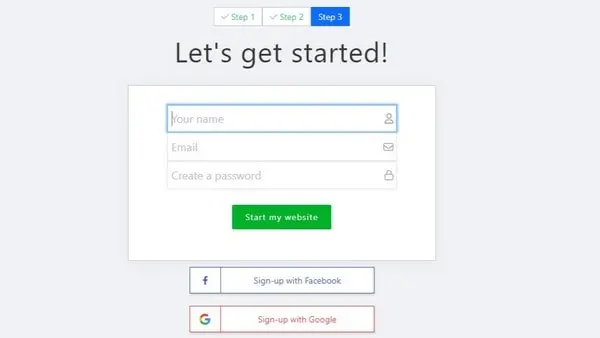
To enter the website builder, you will have to complete a simple registration. It will take only three simple steps.
First of all, the system will ask you to indicate the type of future project. Users may choose from blogs, digital stores, small business sites, event projects, calendars, portfolios, CVs, and others.
At the next stage, you will need to give your website a name. It is very important to think of a good one, as the system will use it when generating a domain.
The good news is that you will be able to change it in general settings inside the dashboard but ONLY BEFORE you publish the website.
The last stage is to log in using a Google or Facebook account. Another way is to indicate the user’s name, email, and password. Once you are done, the system will let you walk inside the admin panel.
Template Editing
The SITE123 dashboard is very easy to use, intuitive, and understandable even to a newbie. It contains only useful options and features that affect the quality of websites you will create. It is so simple that even a newbie can learn it in less than 10 minutes.
This is the place where you can start editing your project, pick a domain name for it, and customize the major website settings.
As soon as you are done with that, you may proceed to your website development and design customization. Fortunately, the website builder comes with a simple, intuitive, and understandable control panel.
It grants access to the following sections: Homepage, Pages, Design, Settings, Domain. The preview option is available here as well to let you see the way your newly-created website will look on different mobile and desktop devices.
Each of the sections can also be managed and edited in detail. SITE123 is a good pick for whoever wants to build a website and does not have the knowledge in the area and for those who don’t know a lot about the process of website creation yet.
When you are done with editing, you may finally go live. All that is left is to connect a domain or use the existing one provided on default.
SITE123 makes it easy to connect your own domain or buy a new one right from the dashboard. Simply type in the name and get several variants with not occupied domains available for purchase.
The system makes it possible to access the Dashboard itself. This is the place where you can see all the websites you have created.
You can edit, copy, and delete them, add new ones, set up domains, check your balance, etc. You can also look through the list of incoming messages, orders, comments, and newsletters for each website.
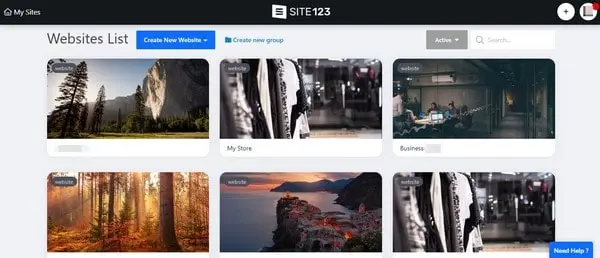
SITE123 comes with a visual editor without the ‘drag and drop‘ feature: all changes at the website are made through the sidebar settings and are seen in the real-time mode.
SITE123 eCommerce
For those who are going to use SITE123 to launch functional, logically-structured, and visually-appealing eCommerce stores, the system offers an advanced eCommerce tool that allows creating an impressive online store for effective customer generation.
Product/Order Management
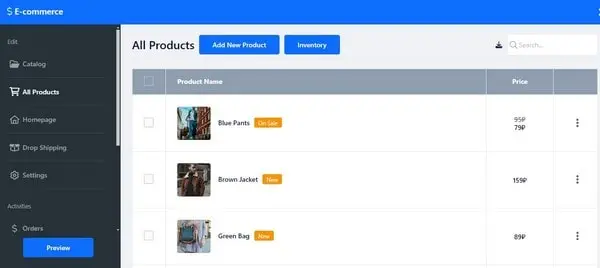
With SITE123, you’ll be able to manage the orders and products to boost your online sales and provide customers with flexibility of choice. It is also possible to adjust your web store design based on the niche you specialize in. This concerns all the elements of your online store, starting with show window design and up to the shopping cart look.
Apart from that, the website builder lets you set product characteristics (color, dimensions, material, price, discounts, etc.) and subdivide the goods into categories based on these parameters. This contributes to better perception of products by customers, encouraging them to buy from you in a simple and convenient way.
You can also benefit from making use of this option as you won’t have to duplicate products available at the website. Furthermore, you will be able to add as many product photos as needed allowing the potential customers to view the goods from different angles, exploring their special characteristics.
Another advantage of SITE123’s eCommerce engine is an opportunity to add new products to the catalog, and also to the homepage of your web store. This is how you will notify users about new arrivals, encouraging them to browse the assortment of available products. The feature helps draw in more clients and shows that your online store is regularly updated.
SITE123 also allows adding ratings (from 1 to 5) to user testimonials. This lets you see whether other users are satisfied with the products/services and whether they agree with the reviews of other customers.
Payment Options
SITE123 now comes with several payment methods such as PayPal, Stripe and 2Checkout, Braintree, Square, Amazon Pay, authorized.net and more, which makes it possible to accept payments online.
If a user cannot make online payments for some reason, the system allows making use of the offline phone / bank transfer option.
The website builder also provides multiple currency choice options, offering a broad range of local and international currency types, the list of which is being updated on a regular basis.
Another highlight of the SITE123 eCommerce toolset is the ability to create and manage coupons to offer discounts to users shopping in your store. Most customers appreciate this option and will be more likely to come back again.
Among the other advantages of the SITE123 eCommerce tool, it makes sense to mention multiple gateway integration, tax and shipping settings, selling digital products along with physical ones, shopping cart display in the web store menu, store inventory system set up, display of related products, product categorization options, and more.
These features make SITE123 a great choice for users, willing to establish a reliable web store presence.
How to Set Up a Web Store with SITE123
Setting up a web store with SITE123 is a straightforward process that allows launching an online business quickly and efficiently. SITE123’s platform is designed for ease of use, making it accessible even to those without prior web development experience. Here’s a step-by-step guide to help you set up your web store:
- Sign Up and Choose Your Plan
Start by visiting the SITE123 website and sign up for an account. You can start with the free plan to explore the platform, but for full e-commerce functionality, you’ll need to upgrade to a premium plan that supports online selling. Select the plan that best suits your business needs, considering factors like the number of products you plan to sell and the level of customer support you may need.
- Choose Your Website Type
Upon registration, SITE123 will ask you what type of website you want to create. Select “Online Store” from the options provided. This ensures that your website template and initial setup are optimized for eCommerce.
- Customize Your Website Design
Choose a template that matches the look and feel you want for your online store. SITE123 offers a variety of templates designed for e-commerce. Customize your template with your brand colors, logo, and preferred layout. With SITE123’s intuitive editor, you can easily modify design elements to align with your brand identity.
- Add Your Products
Navigate to the website’s backend and find the “Store” section. Here, you can start adding your products.
Create product listings by including product names, descriptions, prices, and high-quality images. Be sure to organize your products into categories if you have a wide range of items, making it easier for customers to browse your store.
- Set Up Payment Methods
SITE123 supports various payment options, including credit cards, PayPal, and Stripe, among others. Choose the payment methods you want to offer and follow the prompts to set them up. This may involve creating accounts with third-party payment processors if you haven’t already.
- Configure Shipping Options
In the “Settings” section of your store, you can configure your shipping options. SITE123 allows you to set up different shipping rates based on location, order value, or weight. Decide what works best for your products and customer base.
- Set Up Your Domain
If you haven’t already, choose a domain name for your online store. You can purchase a domain through SITE123 or connect an existing one if you already have it. A custom domain helps enhance your brand’s professionalism and makes it easier for customers to find you online.
- Review and Test Your Store
Before launching, review your website thoroughly. Check for any errors in your product listings, test the checkout process, and ensure all your web pages are loading correctly.
It’s a good idea to place a few test orders to see everything from the customer’s perspective and ensure the payment and shipping setups work as expected.
- Publish Your Website
Once you’re satisfied with your store, hit the “Publish” button to make your website live. Congratulations, your SITE123 online store is now up and running!
- Promote Your Store
With your store live, start promoting it through social media, email marketing, and other digital marketing strategies to attract customers and drive sales.
Remember, running an online store is an ongoing process. Keep your product listings updated, engage with your customers, and continually optimize your site based on performance and customer feedback. With SITE123, you have a robust platform to support your e-commerce journey every step of the way.
Blog
Launching a blog is an effective way to give your website better online exposure and attract the attention of users interested in your niche. This is a helpful tool to post versatile content, including articles, your own posts, photos, videos, audio files etc. Topics may differ with regard to your blog specialization and the goals you pursue.
Creating a blog with SITE123 doesn’t take much time and effort as the system provides you with all the required tools and options needed for this purpose.
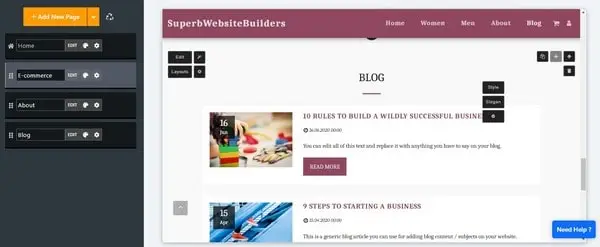
You can choose a wide variety of high quality blog templates based on the style, theme, and features you need. Having written a new post, you don’t have to add it immediately to your blog.
The scheduling option allows you to set the date and time when you would like your posts to be published. You can go on a vacation or plan your everyday life as you need, for example, and the system will automatically update your blog with new scheduled posts.
SITE123 also has a great blog commenting system which allows users to leave their comments under each post, share their ideas, and initiate discussions on the topics tackled. The feature is a nice tool to grow your website traffic and keep your blog interesting and live.
If you don’t wish to approve each blog comment, you can set up the auto confirm feature, which will automatically accept all the blog comments without any preliminary moderation, thus saving your time and effort.
At the same time, the system makes it possible for you to reply to each comment individually. If you wish, you can use the Disqus or Facebook comment systems when managing your blog comments.
If you wish to allow users to follow your blog updates on time, SITE123 makes it possible to generate the RSS feed readers clients can use to track the blog updates. The option is easily accessible in the settings section.
You can also enable the feature that shows the date of your blog post publication. This is one of the best ways to show how regularly you update the blog and how contemporary it is.
Displaying the date that a blog page was published is a great way to show your readers when you published the post. This shows how contemporary your blog is and is excellent for letting your viewers know that your website is being consistently updated.
SITE123 also makes it possible to remove social share buttons from your blog. This is a handy option that lets you make sure users won’t be able to share your blog posts via their social media accounts.
This is also an effective measure that helps retain website visitors instead of redirecting them to external social media accounts.
With SITE123, you can now apply the automatic internal link building feature for articles and blogs. The tool makes it possible to automatically link related articles and posts based on the selected SEO keywords. This eventually improves the overall SEO performance and connectivity of your blog content.
Website Access
The website builder allows setting website access rights with regard to your needs and requirements. There is an opportunity to set your website as Members Only to make it accessible only by those users you will assign website access rights to.
To do this, go into your account, get to the dashboard, click the Settings, and then the Website Access button. You will be offered to choose the Members Only feature.
To grant website access to another user, you will have to specify the email address of this person, who will receive the access code via email. This is quick and easy for everyone.
Customer Interaction Tools
SITE123 comes with several handy customer interaction tools. You can make use of the Schedule Booking feature to let clients book their appointments directly at the website with regard to their scheduling needs.
The same feature exists in the Restaurant Reservations feature. The system allows accepting, confirming, and canceling table reservations on the website, which also contributes to ease of use and customer convenience. Finally, you can sell tickets for the upcoming events and customize them online.
Logo Tools
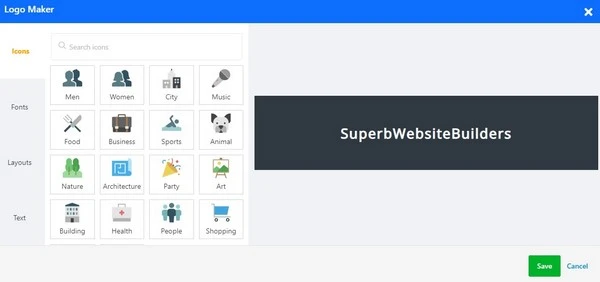
SITE123 makes it possible to design and integrate a business logo into your website. The system offers access to built-in tools that help make your logo look impressive and attractive.
You can make use of the cropping tool, website logo size slider, header size adjustment options, pick logo style, and font size, etc. It’s also possible to use any icon as your website logo, if you haven’t got a ready-made logo or time to design it.
Custom Form Builder
With SITE123, you can create and integrate impressive custom forms into your website by using the high end form builder tool. The system offers a broad selection of custom form layouts and features you can insert, remove, and customize with regard to your needs.
The feature is particularly beneficial for businesses, bloggers, educators and event organizers who need to gather data from site visitors, customers or participants. The form builder is user-friendly, requiring no coding skills, and can be customized to fit a wide range of needs.
Free SSL / HTTPS
Making sure a site is protected from unauthorized access is a must for any website owner. Realizing this necessity, SITE123 allows connecting the secure SSL encryption protocol to your project, thus, making you feel sure about its safety.
SSL-certified websites have a higher degree of confidentiality, while the data they contain are protected by the advanced security settings 24/7. SITE123 offers this option for free.
Email Accounts
Having an email that will look like email@yoursite.com will contribute to your website promotion and traffic growth. This gives any website a professional look, not to mention the increase of your business reputation and growth of customer trust. With SITE123, you can create and activate your domain-related email at no cost at all!
Multilingual Website
SITE123 has launched a very useful language tool for international businesses. You don’t need to create a separate website in other languages, you can simply add another language version to your website.
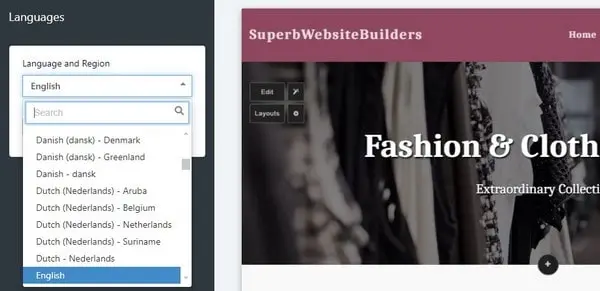
This website builder has a set of features I have never seen in any website builder before. The system automatically translates all headers, subheaders, and content of your site.
Using the Language manager, you can edit the default website translation in a split dialog window, where in the left side there is your original content and on the right side you have the content from another language version. The number of language versions can be up to 5 languages (depending on your pricing plan).
You can also connect a separate domain name to each language version in one click – the dream of many webmasters who work with multilingual websites.
App Market
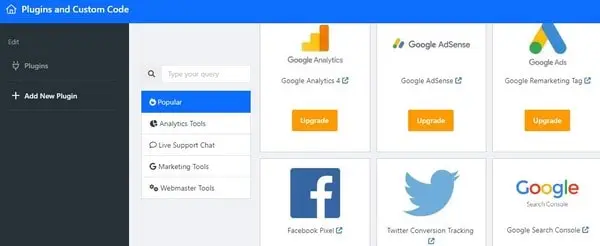
The website builder offers an impressive App Market with lots of extensions and add-ons to be integrated into a project. The selection of apps is impressive and they are subdivided into categories to simplify the choice.
You can browse the following sections to find the application that works best for your type of project: Analytics Tools, Live Support Chat, Marketing Tools, Webmaster Tools, Forms, Booking, Galleries, Pricing, Online Store, Social, Payment Gateway and Popular.
If you don’t manage to find the required app, the search filter option available here will help simplify the task.
Key Features of the SITE123 App Market
Diverse Range of Apps: The App Market includes various applications covering categories like e-commerce, social media, marketing, analytics, and customer support. This diversity ensures that you can find the right tools to meet your specific website needs.
Easy Integration: Apps from the SITE123 App Market can be easily integrated into your website with just a few clicks, requiring no complex coding or technical knowledge. This ease of use makes it accessible for users of all skill levels.
Customization Options: Many apps within the marketplace offer customization options, allowing you to tailor their appearance and functionality to match your website’s design and your business requirements.
Seamless Performance: Applications selected from the SITE123 App Market are designed to work seamlessly with your SITE123 website, ensuring smooth performance and a cohesive user experience.
How to Use the SITE123 App Market
- Accessing the App Market
Log into your SITE123 dashboard and navigate to the “App Market” section. This can typically be found in the website’s settings or management area.
- Exploring Available Apps
Browse through the available applications, using categories or the search function to find specific tools you’re interested in. Each app listing includes a description, key features, and sometimes user reviews that can help inform your choice.
- Selecting and Installing Apps
Once you’ve found an app that fits your needs, select it to view more details. If you decide to proceed, follow the prompts to install the app on your website. The process is usually straightforward, involving just a few clicks.
- Configuring App Settings
After installation, you may need to configure the app’s settings according to your preferences and needs. This could involve linking accounts (for social media or analytics apps), setting up payment options (for e-commerce apps), or customizing display options.
- Testing the Integration
It’s important to test the app on your website to ensure it’s working as expected. Check for any issues with functionality or site performance and adjust settings as necessary.
All in all, SITE123 is a great choice to develop business websites and blogs. You can also create a small or midsize eCommerce store, but get ready to add all the products manually.
There is a shopping cart and an opportunity to integrate PayPal and Stripe and other leading online payments methods.
Free Domain Registration
With SITE123, you can get a free domain and connect it to your website in no time. It is also possible to manage it independently on the platform. The domain comes with SSL/HTTPS encryption and you can choose almost any extension you need. Currently, the system offers over 365 extensions to pick from. Additionally, you get a personalized mailbox to conveniently manage your domain.
Domain Transfer
The company has recently added the option that allows transferring a domain name from another registrar to SITE123 servers. The feature will be valuable for users who already have their sites hosted on other platforms and have domain names registered there yet plan to move their projects to SITE123.
To activate the feature, just access your account dashboard to reach the “Domains” section and then the “transfer domain” tab. Adjust the settings there to complete the migration process.
Free Image and Icons Library
The website builder grants access to its free library of stock icons, videos and images. They belong to various niches, which allows picking the best samples for any type of project. All the files are of high quality and you can even use a search filter option to choose the required variants.
Schedule Booking
From now on, your clients can schedule appointments and events due to the advanced schedule booking tool. It is possible to add new services and events as well as to manage the existing plans online.
Each event/schedule can be customized with regard to your needs. Using a simple editor will help you with that.
Likewise, you can create any number of service categories to further organize each of them, set personal/group service types, add multiple participants for each service, set its duration, location, pricing and other required parameters.
Event Planning
The platform makes it possible to plan events and sell tickets for them online. You can also customize each event to meet your individual needs and requirements due to multiple event options provided by default.
The system allows setting up special ticket parameters and offering different types of them for sale. If you need, you can also issue coupons and discounts for the planned event to drive user attention.
By the way, SITE123 has taken care of its users by integrating the opportunity to generate PDFs of purchased booking tickets. The feature makes it possible to easily create and manage tickets in the convenient PDF format to help you conveniently keep track of your bookings. What’s more, you will be able to offer professionally-looking tickets to your customers.
Another feature recently introduced for events is the seating arrangement option. It lets you create custom seating plans using ready-made templates to organize special seating for your event. You can even organize and arrange a standalone seating plan, thus enhancing your attendee experience.
Restaurant Reservations
SITE123 is a nice solution for restaurant owners as it now makes it possible to accept table reservations directly on the website. The high end reservations tool allows confirming reservations (both manually and automatically), creating/managing restaurant menus, setting table size and restaurant address/opening hours etc.
One Page/Multi Page Option
As a website owner, you can now decide what type of website you need – one page or multi-page. You can adjust the corresponding option in the Settings section of your website control panel.
The one-page option is ideal for those who prefer a simple, streamlined approach to web design, where all the content is presented on a single page. This layout is particularly effective for portfolio sites, event announcements, or small businesses that want to convey a concise message without the need for visitors to navigate through multiple pages. The one-page format facilitates a smooth scrolling experience, allowing visitors to easily access information in a logical sequence, enhancing user engagement and satisfaction.
The multi-page option, however, suits users who require more comprehensive websites with a significant amount of content, such as eCommerce stores, blogs, or corporate websites. This format allows for a more organized presentation of information, dividing content into separate pages based on categories or topics. Users can take advantage of the multi-page layout to create a more detailed and hierarchical structure, making it easier for visitors to find specific information. Additionally, a multi-page website can support a broader range of SEO strategies, potentially improving search engine visibility and site traffic.
Third-Party Plugins
The site builder grants access to its collection of plugins and extensions. A user has an opportunity to pick and implement versatile add-ons based on their website needs and specialization. These include analytic tools, live chat, webmaster tools and more.
The process for adding these plugins is designed to be straightforward, often requiring just a few clicks to embed a plugin or use a provided widget code that can be placed directly into the site’s HTML. This ease of integration ensures that even users without extensive technical knowledge can significantly enhance their website’s capabilities, improve user engagement, and optimize their site for better performance and functionality.
Tools for Musicians
SITE123 is a great tool for all types of web projects, including websites for musicians. It offers multiple features for this kind of site, such as the opportunity to upload and download music files, share your audio/video files on the web, add events and tour dates, upload press reviews and integrate Bandsintown and Soundcloud apps, sell music and merchandise.
Design & Templates
Right after the registration procedure, you will be offered to choose one of the categories for a future website (restaurants and food, business, photography, events, technology and web, CV and portfolio, transportation services, hospitality and tourism, music, health and wellness, recreation and sport, creative arts, fashion and beauty, online shop, handyman services, community etc.).
Each category has from 5 up to 10 themes. The quality of templates is high, although their versatility is a bit doubtful. Fortunately, customization tools at SITE123 are flexible and easy-to-use.
Template Customization
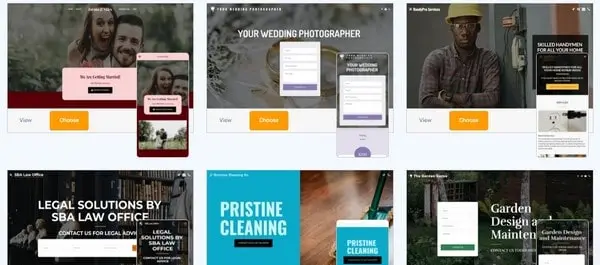
SITE123 provides extensive template customization options, letting users tailor their chosen templates to better reflect their unique style and branding needs.
Design customization within SITE123 is user-friendly and intuitive, ensuring that even those with minimal web design experience can easily modify their site’s appearance. Users can change color schemes, font styles, and layout configurations to match their brand identity or personal preference.
By the way, the system has recently added new customizable layouts for the Team Page, Services Page, FAQ Page, Customers Page and Gallery Page (the one with grid design).
Actually, you can apply any of 13 available tools for each template. In this case, the positioning of blocks will notably change. Color styles are also adjustable in the platform. You can choose any color scheme offered or adjust it manually.
Additionally, SITE123 allows for the integration of custom logos, background images, and multimedia content, enabling further personalization. It is also possible to change menu button styles, fonts and enable/disable social media buttons.
Changing templates on the go is not allowed here. Each of them comes with thematic demo-content. If the template you have selected has not come up to your needs for any reason, you can quickly adjust it by removing or adding pages straight from the editor.
But that’s not it. SITE123 developers have introduced the reusability option for existing content. This means that you can now use the already-published page multiple times within the same website. As a result, you will get the possibility to use the items from a source page across various pages without their duplication. The selected items can be managed only once and then displayed on other required pages, thus simplifying the website creation process and saving your time in general.
To sum up, SITE123 offers similar, high quality templates. The only thing that differentiates them are the images in the demo-content. You can change the structure and design of the home page, enable parallax effect and transparency, upload your own images, and change fonts and color schemes.
The website builder also offers an opportunity to create a site in two variants, specifically one-page and multi-page. Correspondingly, you will get either a landing page or an ordinary website with the same content. Anyway, this website will be responsive to fit any display sizes.
Customer Support
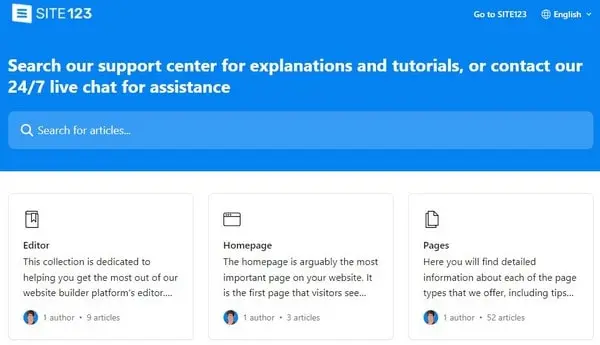
One of SITE123’s big advantages is its 24/7 live chat with real agents. The support on the chat is given in English and in another 12 major languages such as French, Spanish, Portuguese, Italian, etc. My live chat test proved that those guys really work online. They answered my questions in 1-2 minutes.
Additionally, users will appreciate a comprehensive Help Center with a wide range of issues and areas covered. Here you may search for specific questions as well as opt for ready-to-use articles and guides on how to create pages, set SEO settings, create new events, configure eCommerce options, etc.
If you need to get in touch with the system experts, you can make use of the SITE123 customer service number. The team knows how to cater to the needs of users better, providing recommendations in different languages.
To make the process even easier for users, who have just registered, the system additionally offers a welcoming video tutorial right inside the dashboard with all major steps described in detail.
The Support section is also the place where you can order custom website design. Just apply for the service offered by the system developers who are ready to build the time according to your guidelines in no time. Take your time to fill out the online form to let the team start working on the project. You will be even assigned a personal project manager to manage and control the website on all the stages of its development and afterwards.
Plans & Pricing
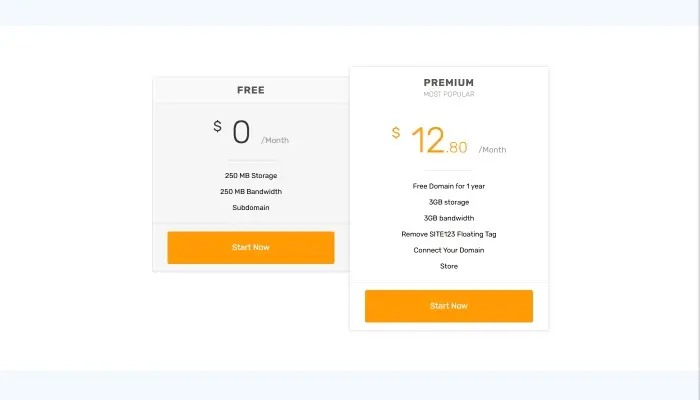
Unlike other website builders with multiple complex subscriptions, SITE123 offers two major plans making it clear and simple for users to decide on what they need. Those plans include:
- Free ($0/mo billed annually) – 250MB of disk storage space, 250MB of bandwidth, subdomain
- Premium ($12.80/mo billed annually) – 3GB of disk space, 3GB of bandwidth, remove SITE123 Floating Tag, free domain for 1 year;
Premium plans are enough for a small project within giving users a chance to scale or grow their business, as they will definitely require improved capacity and resourcefulness. Mind that the longer the term of the subscription is, the bigger the discount will be.
Conclusion
SITE123 is an excellent website builder for most users, including those who intend to set up projects from scratch. It can be applied to create business websites and online stores, as well as galleries, portfolios, and more. There is also an option to build blogs and landing pages of great quality that will surely meet the needs of professionals. Setting up plugins can notably expand the functionality of the system, and this makes the website builder a versatile tool for creating different types of projects.
While testing the platform, I have concluded that my initial impression on SITE123 corresponds to its real features. The website builder is great both for personal use by newbies and for professional web designers. It looks reliable and attractive, while its functionality is sufficient to work with clients’ websites.


