

Hostinger – is one of the largest players in the industry of hosting. It offers one of the affordable servers on the international market.
The company’s initial activities in the hosting market date back to 2007. Then they launched their first service – ads-free hosting at zero cost. In response to the constant interest in their offer, the Hostinger brand was developed, where there are no more free plans, but the prices are extremely low and the possibilities are much wider.
This idea was successful because, in 2014, they provided services to over a million users! Now, in 2024, the hosting provider powers 3,933,059 websites in 178 countries around the world.
At present, the web hosting provider offers packages in virtual hosting, cloud hosting, VPS servers, domain registration and a built-in Hostinger website builder. The company’s wide experience cannot be denied, but how did it become so popular? Below we present a detailed review of Hostinger: pros and cons, features, pricing and other important details.
 |
|
1. Pros and Cons
Having studied Hostinger’s customer reviews, it’s clear that the company is distinguished by its abundance of options. The variety of offered services allows the provider to adapt them to the needs, requirements, and financial capabilities of the client. Everyone will find a suitable solution.
Pros: | Cons: |
| ✔ Free domain and site migration ✔ Easy-to-use WordPress plans ✔ Built-in website builder ✔ Linux and Windows solutions ✔ Multi-language 24/7 support ✔ Simple and easy setup ✔ 10 GB storage ✔ Extensive offer, and quality service ✔ Attractive hosting plan prices ✔ 30-day refund guarantee ✔ SQL and PHP Support ✔ Intuitive web page design ✔ Free domain name for the 1st year ✔ 99.9% uptime guarantee ✔ eCommerce features | ✘ Price increase after service extension ✘ No technical support by phone ✘ No specific plan in WordPress ✘ No dedicated servers offer ✘ Limited resources on cheaper plans ✘ Automatic data backups may not be available on all plans |
In brief, the products of Hostinger are worth recommending because of the high quality and competitive prices.
Hostinger Features

This website builder has most of the basic features offered by its rivals. All pricing packages include the following key features:
- Convenient and trustworthy: for bloggers looking for cost-effective services along with proper functioning of websites, this solution can be a gold mine. It is quite reasonable and reliable website hosting, which is provided for free for life.
- SQL and PHP Support: While most web hosting services offer a drag-and-drop website builder in a free package and limit access to PHP and SQL until you pay for it and provide it only in a premium plan. Hostinger delivers free PHP and SQL support, which probably makes this service the best hosting for WordPress.
- No ads and banners: The free hosting package does not require the display of ads on your website. Automatic Inc WordPress does not allow you to advertise on your blog if you purchase web hosting via their service. WordPress will display its specific ads on your blog and you will not get a dime.
- Simple and low-priced AI Website Builder: Hostinger supports the built-in website builder, which allows creating simple projects using a drag-and-drop feature and has over 150 quality templates to pick from. The drag-and-drop option is a very easy way to create attractive sites in a short period. The website builder provides AI-powered content creation completed in almost no time.
- Quick Installation: The company provides a free subdomain that will allow you to set up an account instantly. Accounts are approved straight away, and this means that you will not have to wait for anything to begin using this free service.
- SSL certificate: Hostinger offers you an SSL certificate in all plans, which is very profitable. It offers you a variety of possibilities. It has various functions to protect your site. The website is extremely insecure and vulnerable to data theft if you do not use SSL protection.
- Easy Money: The provider allows you to invite friends and earn money. Every time your contact buys a premium service based on your recommendation, you get a share.
- Variety: They offer several hosting types including virtual hosting, VPS hosting WordPress hosting, and Minecraft hosting.
- Free Options:
- All hosting packages, except for the single shared plan, come with a domain name free of charge.
- Free site migration – a specialist team will transfer your site for free.
- Free SSD drives are part of all shared hosting plans.
- All business packages come with a free SSL certificate, Cloudflare CDN and Let’s Encrypt.
- Extra Features: Servers run on HTTP2, PHP7, LiteSpeed, built-in caching technology.
- AI Logo Generator: The system makes it possible to create a logo using its integrated AI tools. Just provide the required info (brand name, your logo design preferences etc.) and the system will come up with multiple logo ideas. Having picked one, you can just download it for further use.
- Business Name Generator: Along with a brand logo, Hostinger uses its AI power to help you create a unique business name that will reflect your brand identity. What you need is just to type in several relevant keywords in the search bar, while the system will automatically do the rest. The feature is absolutely free for all subscribers.
- Website Migration Help: If you already have a website hosted elsewhere, Hostinger may provide website migration services to help you transfer your site to their servers.
- Email Hosting: Some hosting plans come with email hosting, letting you create personalized email addresses with your domain name.
Hostinger Dashboard

Some of you have probably never encountered an easy-to-use web hosting service before, but it’s possible with Hostinger.
Basically, the control panel uses a similar concept to Microsoft tiles. With large panel buttons, you can find everything you need at any time. Hostinger doesn’t hide features or settings to make your space look neater. Instead, the service puts them on public display, so everything you need is always at your fingertips. You can see a category or option easily, as well as an image that gives some idea if you’re not sure what a particular feature does.
Hostinger offers its clients an original control panel – hPanel. Since the services offered by the company are user-friendly, even a novice user can handle an intuitive panel. If you have previously used a different web hosting, you can skip cPanel. It seems that cPanel is the only permanent feature among web hosting options, but many new users find it difficult to navigate it and find what they need.
People who worked with classic cPanel will appreciate the settings. The provider took the best of it and adapted it to user requirements. Due to this, the panel has been thus updated and adapted to the offer. As a result, it is now working much faster. From the panel, you can intuitively install a CMS system, manage email mailboxes, configure domains and manage files located on the server.
A clear, fast and manageable user panel based on the widespread cPanel allows you to effectively use the well-ordered services. Users also praise the company’s offer for cheap and extensive add-ons, such as a WordPress optimization tool, a website builder, or integration with GitHub. What you can complain about is a significant growth in prices after the extension of hosting.
Security

Most people think that the presence of an SSL certificate will solve all their security problems. However, this is not the case – you need much more security measures than that to protect your site, and this is what Hostinger offers to its customers:
- Bitninja is included in all plans. It is a comprehensive real-time protection package that prevents malware, XSS, scripting DDoS, brute force, and other programmed attacks.
- Hostinger also provides each plan with SpamAssassin, which is an email spam filter that automatically scans and removes spam in the email.
- A free SSL certificate is a part of the general Business plan, which is ideal for minor businesses that intend to protect their customers’ data.
- Recently, Hostinger introduced two-factor authentication to its users, which allows you to identify yourself as the account owner by providing both your phone number and email address. Any account now has an additional, manual level of protection owing to two-factor authentication.
- Hostinger uses reliable DDoS protection to safeguard websites from large-scale cyber attacks that attempt to overwhelm the server and disrupt website availability. DDoS protection helps maintain website uptime and ensures it remains accessible to visitors during such attacks.
- The host also implements firewalls to filter and monitor incoming traffic. This prevents unauthorized third-party access and potential threats from reaching the server and the website. Firewalls act as a barrier against malicious activities and hacking attempts.
- Hostinger operates data centers with stringent security measures, including physical security, access controls, and redundancy to ensure data integrity and protection from physical threats.
- The company isolates user accounts on shared hosting environments. As a result, factors affecting one website or account are less likely to impact others on the same server. This guarantees an extra security level.
To wrap up, all plans come with:
- Cloud protection
- Spam protection
- Daily to weekly data backups
- SSL certificate
- BitNinja Smart Security Protection
We can see that the provider takes security concerns seriously, considering their affordable shared hosting plans, they still can provide the best security measures in the industry.
Performance

Fundamental aspects that all users are looking for are speed and uptime. Since swift server response time means not only fast and convenient use of the site but also a better rating and position in search results, we carefully analyzed the server response time data in Hostinger. The collected data for the last six months demonstrates that the average response time was only 288 ms.
Server uptime is also one of the most important aspects. There is nothing more annoying than information from your readers or customers that the website is not working. After analyzing the reports for the last six months, we can say safely that Hostinger is not affected by this problem. The operating time of the servers ranges from 99.95% to 100% per month.
In addition, from the point of view of performance, the hosting provider deserves the highest rating. Of course, a lot depends on the chosen service type and the specific plan, but they offer a lot of interesting solutions that directly affect the speed of the sites.
Here you should evaluate the default caching support of IPv6, PHP 7, HTTP/2, and LiteSpeed caching by default. Besides, the option of WordPress Acceleration is available for all packages, which optimizes pages via using this CMS well. The bonus here is the AI website builder, which is not only easy to use but also ensures that all pages created with it are light and well-optimized. This also affects the speed of the website.

The average test values of the waiting time are shown below:
- London: 0.54 seconds
- Washington, DC: 0.81 seconds
- San Francisco: 1.12 seconds
- Sydney: 2.49 seconds
- Tokyo: 1.57 seconds
Generally, these are great results. The best practice is to keep the page loading time less than two seconds. Based on these results, it became clear that Hostinger’s servers work excellently on both sides of the Atlantic, and particularly well in London.
From this, we can conclude that Hostinger is likely to have an acceptable speed in many English-speaking countries.
Shared servers of Hostinger will be enough for many websites. Yet, if you wish to manage a site with high traffic or see unexpected spikes in activity after the site is launched, an updated plan may be the optimal option.
Hostinger AI Website Builder
The Hostinger AI Website Builder (previously known as Zyro) is a user-friendly tool designed to help individuals and businesses create professional-looking websites without the need for coding knowledge. The software is currently powered by Hostinger, making it possible to set up, customize and develop personal and business websites. Due to the drag-and-drop interface, the website builder becomes accessible for users of all skill levels – from beginners to more advanced users looking for a quick and efficient way to design, launch and host their online presence at a time. Let’s have a look at the features the Hostinger Website Builder has to offer to its subscribers now.
Pros and Cons
Pros of Using Hostinger Website Builder
- All-in-One Solution: Hostinger offers domain registration, web hosting, and the website builder itself, making it a convenient one-stop shop for getting your website online.
- No Technical Skills Required: The intuitive interface means you don’t need to know how to code or have prior web design experience to create a beautiful website.
- Fast and Reliable: Hostinger’s infrastructure ensures that your website is not only easy to create but also fast-loading and reliable for your visitors.
- Cost-Effective: With various pricing plans, including options that are very affordable, you can get your website up and running without a significant investment.
- Ready-Made Responsive Templates: Ensures that your website looks great and functions smoothly on any device, be it a desktop, tablet, or smartphone.
- AI Website Builder: As the AI-powered software, Hostinger website builder makes it possible to start a project by answering simple questions generated by the system.
Cons of Using Hostinger Website Builder
- eCommerce Limitations: For businesses looking to expand their online store, the eCommerce capabilities might be basic compared to specialized eCommerce platforms. Currently, Hostinger eCommerce functionality is somewhat limited and, thus, insufficient for the development of full-featured online shops.
- Baseline SEO Tools: The SEO features provided are helpful for beginners but might not satisfy the needs of more advanced users looking for in-depth optimization.
- Limited Integration with Third-Party Tools: There may be limitations in integrating advanced marketing, analytics, and optimization tools that some businesses require.
- Extra Costs: Some features and functionalities may require upgrading to a more expensive plan, leading to higher costs than initially anticipated.
- Platform Dependency: Using Hostinger Website Builder means your website is tied to its ecosystem, which can make migrating to another platform in the future challenging and time-consuming.
Template Designs and Customization

With Hostinger Website Builder, you get a quality tool with a free collection of over 150 special templates for every taste and every need. Website creation is generally a complex process. However, the templates offered by Hostinger are already ready to work, free and optimized for SEO and mobile devices.
There are dozens of templates divided into thematic types including E-commerce, Services, Portfolio, Continue, Blogs Landing Pages etc.
You no longer need to worry about how to make your website. Creating a website with the help of a designer does not require any special knowledge and skills. If you don’t like the ready-made looks, you can create your template from scratch.
The site builder itself does not restrict you to any specific markup after choosing a design. Everything you will see in the preview mode is adjustable and customizable with regard to your needs. You are free to set up colors, fonts, images and other design elements to create a unique and personalized website.
Hostinger Website Builder Features
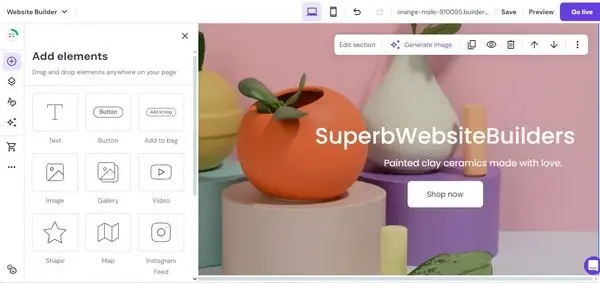
When you opt for the hosting provider from Hosdinger, you instantly get access to its website builder. Thus, you have to be aware of the main features and tools the constructor has to offer.
- Drag-and-Drop Editor
- eCommerce Capabilities
- AI Features
- Domain Options
- 24/7 Support
- Video Integration
- Google Maps Integration
- Integration of CTA Buttons
- Blogging Tools
The cornerstone of the Hostinger Website Builder is its intuitive drag-and-drop editor. This feature notably simplifies the website creation process by letting users easily add, move and edit elements on their website without any need for coding knowledge. Whether you’re looking to insert text, images, buttons or videos, you can do it all with a simple click and drag, making it possible to design professional-looking websites with ease.
For those looking to sell online, the website builder includes features to create an online store, manage inventory and process payments securely. You can set up product listings, manage inventory, and process payments using popular payment gateways.
Hostinger website builder is AI-powered. This means that it offers the automated process of content creation based on the submitted information. Likewise, there is the AI logo maker here and business name generator that will help you pick the best brand name and design the most suitable logo with regard to the specified preferences.
When you are ready to place your website on the Internet for everyone to see, you will choose a domain for free if you use the Premium or Cloud package. Buying domain names can be a bit tricky, as they seem cheap at first, but can become quite expensive. If now you can save some money on a domain, it is worth the cost of using this web hosting.
Users have access to Hostinger’s customer support team around the clock to assist with any questions or issues that may arise during the website building process. There is live support via chat or email that will resolve your issue in less than 3 minutes. The support team members speak over 10 languages that ensures smooth and convenient communication.
To enhance the visual appeal and engagement of your site, Hostinger’s Website Builder supports easy video integration. Users can embed videos directly into their web pages from popular platforms like YouTube and Vimeo, providing a dynamic way to showcase products, explain services, or share brand stories.
Including a Google Maps widget on your site is straightforward with Hostinger. This feature is especially useful for businesses with physical locations as it allows customers to easily find your premises. The integration process is simple, enhancing user experience and contributing to your site’s functionality.
CTA buttons are crucial for guiding users towards desired actions, such as making a purchase or signing up for a newsletter. Hostinger’s Website Builder offers customizable CTA buttons that can be integrated seamlessly into your website, helping to improve conversion rates and user engagement.
For users interested in content marketing or sharing updates, Hostinger provides robust blogging tools. These tools make it easy to publish, manage, and promote blog posts, complete with features for categorizing articles, scheduling posts, and integrating social media sharing options.
Getting Started
To start building your website with Hostinger’s Website Builder, follow these simple steps:
- Describe Your Brand: Answer 3 simple questions concerning your company/brand to let the system pick the best template for you.
- Explore the Provided AI Content: The AI tool will provide you with a unique and SEO-friendly template option along with relevant images.
- Customize the Design: Use the drag-and-drop editor to add your content, images and features to the site. Add new pages. Customize colors, fonts and layout to match your branding.
- Choose Your Plan: Select the Hostinger Website Builder plan that best fits your needs and budget.
- Optimize for SEO: Utilize the built-in SEO tools to help your site rank higher in search engine results.
- Publish Your Website: Once you’re satisfied with your site, hit publish to make it live on the internet.
Whether you’re creating a personal blog, a portfolio, a business website, or an online store, the Hostinger Website Builder offers a straightforward and effective way to achieve your online goals.
Customer Support

Hostinger provides a variety of support service tools, including a knowledge base, email, chat, and help requests, which are available 24/7. Their customer service team is multilingual and ready to find answers to questions from around the world. Hostinger’s extensive library of posts with practical recommendations makes it stand out. These guides cover everything from creating a drop-down menu to copying a website to WordPress.
However, sometimes the operators may provide excellent service only after a long wait. As a reward for waiting, you will get a knowledgeable and detailed solution to your problem. However, the provider has significantly reduced the response time of its operators. The average chat reply time now takes less than 2 minutes.
Hostinger is also missing an important component: phone help, which may be inconvenient if you find the chat impersonal. The company plans to launch internal phone support in 2020, but at the same time, their chat is available round the clock, 7 days a week.
Hostinger Prices and Plans
Hostinger has become widespread around the world, offering reduced prices on the web hosting market. However, having low prices does not mean that the quality of products is low. Thousands of companies from different countries trust them.
Hostinger offers 5 different types of hosting services to clients:
- Shared hosting: starts at $2.99 a month ($7.99 upon renewal);
- Cloud hosting: starts at $8.99 a month ($19.99 upon renewal);
- VPS hosting: starts at $5.99 a month;
- WordPress hosting: starts at $2.99 a month ($7.99 upon renewal).
This is a very affordable web hosting service compared to other shared web hosts.
The general plans offered by Hostinger are:
- Premium – $2.99 per month;
- Business – $3.99 per month;
- Cloud StartUp – $9.99 per month.
If you are going to use Hostinger website builder, the cost will constitute $2.99 per month with further renewal price $7.99 per month. It includes free domain name and email, 24/7 customer support, unlimited bandwidth and free SSL, opportunity to create an host up to 100 websites, eCommerce features, 0% transaction fees, AI tools, marketing integrations, 150 templates and other website-related features.
Some facts to note:
- Remember that when pricing is their constant “sale” for your initial 48-month payment.
- These prices are practically unbeatable, and they would be excellent, even without the constant sale.
- Although virtual hosting plans only cost a few dollars a month, reduced Hostinger prices may be a trap. The problem isn’t the price itself; it’s the price that comes later and the fact that you have to pay annually.
- With Hostinger, you have to take on 48 months of service. If, after a 30-day refund guarantee, you decide that this is not the best solution, it will be hard to get your money back.
- The last thing about payment is that no matter what plan you are on, Hostinger provides only one website. This means you will have to pay for any extra domains. Their prices range from $5 to $17.00 based on which extension you choose.
Verdict
Having studied the provider’s customer reviews, we emphasize that the unquestionable advantage of Hostinger is its wealth. The variety of accessible services allows you to adapt them to the requirements and financial capabilities of the client. Everyone will find a suitable solution. Fast uptime, excellent performance, and completely satisfactory speed make the provided hosting options highly satisfactory.
The software also comes with the built-in Hostinger website builder. It is AI-powered and does not require any coding skills to get started. Instead, it offers a collection of responsive templates, a handy drag-and-drop editor, eCommerce and blogging features etc.
The parameters of Hostinger plans and the available servers are good even within the framework of the basic plans, which allows users to create far-reaching and frequently visited sites. More advanced plans will successfully meet the expectations of the most demanding users. In short, Hostinger hosting is definitely worth recommending, especially because the prices are competitive.
Hostinger will be an excellent choice for anyone who appreciates speed and reliability but does not want to overpay for marketing. After all, a high price does not always mean high quality. You pay only for the product and manage your finances wisely, getting cheap hosting with premium services. We highly recommend looking at the Manual section, especially for novices in website creation. Here you will find comprehensive materials and answers to almost all possible questions.


