

When it comes to DIY website development, Zyro and Wix are those platforms that make it possible to set up, customize and promote all kinds of web projects. The systems both target newbies and web experts, adhering to their major requirements and objectives. At the same time, they differ from each other in terms of complexity, integrations, special features and design customization approach.
Zyro – is a simple and easy-to-use cloud website builder, which lets non-techies design all types of web projects with no skills and programming background required. Powered by Hostinger, the system ensures seamless website performance, niche selection of quality templates, free hosting and SSL connection. Availability of AI-driven tools makes it possible to create user-friendly content without any technical background.
Wix – is the all-in-one cloud website builder, which deserves the title of the top system in the modern web design niche. It grants access to multiple tools, elements and features provided out-of-the-box. The software comes with built-in eCommerce and blogging engines, multiple templates and opportunity to pick a suitable web website editing option with regard to users’ skills and expertise rate.
As opposed to Zyro, Wix does not require special presentation as it is recognized by web designers around the world. However, it still makes sense to compare the major features and tools of both systems to see what each of them has to offer. This should help newbies make the unbiased choice of the platform to pick for their web projects.
General Overview

Zyro cannot be considered a popular website builder as it lacks some of the must-have web design features. This doesn’t mean that you cannot use it for customer website development. The software ensures flawless website functionality and access to baseline features. You don’t have to master coding nuances to get started with your project here – the system is intuitive and understandable for everyone.

The foundation of the website builder dates back to 2019. As of today, the number of projects started with it has reached 100,526. This is not an impressive portfolio, indeed. Nonetheless, the system is worth user attention due to the range of built-in AI-driven tools, user-friendly interface, built-in drag-and-drop editor, free hosting, SSL connection, pre-designed customizable themes and availability of a feature-rich eCommerce engine. This is more than enough to create a website from scratch.
Wix has distinguished itself as the best and the most feature-laden website builder in the contemporary web design market. It has everything you need to get started with any personal or business web project – impressive template gallery, abundance of powerful design customization tools, excellent blogging and eCommerce solutions, diversity of business and marketing options, website editing and SEO features. Whether you intend to set up a business site, a portfolio, a landing page, a blog or a digital store, Wix will certainly be the top platform to use.

The website builder was launched in 2006 as a simple DIY platform to now become the undeniable niche leader. According to recent statistics, over 10,839,692 websites are currently powered by the software and hundreds of them are under construction worldwide. It’s no wonder, as Wix works great for all user categories, irrespective of the available web design background and coding proficiency.
Which One Is Easier to Use?

Zyro offers a set of baseline website development features available in one place. As a beginner-friendly platform, it comes with an intuitive web design approach, free domain and hosting, rich template collection and easy sign up process. What you need to get started with the software is to register for a personal account either by submitting your login credentials or by using Facebook/Google account data. This is simple, fast and convenient.

As soon as you sign up for a personal account, the system will offer to pick a subscription based on your needs. This is an obligatory step you cannot skip. Having selected a theme, you will have to proceed to its customization. The system offers an extensive set of tools you can use to give your project required design and functionality. Connecting a domain is another step you shouldn’t overlook. Additionally, you will have to select a favicon, configure SEO settings for all website pages and integrate third-party extensions. Having completed these steps, you will be able to preview the result and publish your project.
In case you encounter any problems during the process of design customization, Zero customer support is at your disposal 24/7. Managers are ready to respond to your questions in several minutes. Live Chat feature is available here for free as well. To get access to the basic system-related info, you may browse the Help Center to find out more about the issues you are interested in. A detailed FAQ section is another resource you can browse.
Wix has been recognized as one of the simplest and most convenient DIY website builders. Whatever project type you intend to set up with it, you won’t have to dive deep into coding details. Everything is intuitive and understandable here from the very beginning. The system provides you with tips and guidelines on every stage of the website creation process. Just sign up for an account in a few minutes to get started. To get access to the dashboard and control panel, you can submit your login and password. Another option is to use your social network account data. Pick the most preferable solution and proceed to your project customization.

Having entered the dashboard, you will be able to select one of two website editing options – standard editor or Wix ADI. The first option ensures deeper flexibility and opportunity of code embedding, while the second option allows setting up a project in the automated mode. It’s up to you to select the most suitable solution with regard to your requirements and expertise rate.
Wix customer support also delivers exhaustive information about the service. There is a rich Help Center with multiple articles, manuals, guidelines and tips on how to get the most out working with the platform. Users also have an opportunity to browse forum threads and topics to find answers to their system-related questions. If needed, you can get in touch with the customer team by using a ticketing system, email or live chat support.
Design and Flexibility

Zyro and Wix provide enough features to set up, manage and customize quality web projects for personal and commercial use. The systems have much in common yet there are still distinctive features that distinguish them from each other and may affect users’ choice. Zyro may lack some of the must-have options, while Wix delivers them as required. This triggers the need to analyze and compare the main parameters of both systems to simplify the task.
Blogging
Zyro has worthy blogging functionality activated with a click. There is no need to add a new page, select its layout/structure to launch this type of project. Just activate the “Blog” button available in the editor to get a ready-to-use blog section.
To customize your blog, you will be able to add new categories and posts, specify dates, titles and even sort the articles by the topics they cover. Before going live with a ready-made project, you can preview the result and make edits, if required.

When browsing Zyro template collection, you will come across a number of professionally designed templates specifically tailored for blogs. You can choose a theme that suits your style and customize it to match your brand or personal preferences.
It is possible to edit the layout, colors, fonts, and other design elements using the integrated drag-and-drop editor. It allows formatting your text, adding images and videos, embedding social media content, and customizing the layout to make your blog posts visually appealing.
With Zyro, you can also integrate social sharing buttons and enable user comments to encourage users for active participation in discussing your articles.
Wix comes with a powerful blogging engine. You can add and edit posts here, customize and update the existing articles, schedule new publications, adjust SEO parameters, add tags, media files etc.

eCommerce
Zyro boasts quite a powerful Online Store Manager merchants will certainly appreciate. The integrated eCommerce functionality of the platforms works well to set up digital stores of all sizes and parameters. It is possible to make use of multiple tools, an advanced product management system, sale channels configurations, SEO settings etc.
As a store owner, you will be able to add new products along with their titles and descriptions, assign their parameters, change web store specifications and attributes, specify tax and shipping details, upload images, indicate prices etc. there is also a chance to boost sales by creating and customizing lists of featured products here.

The software also unveils an opportunity to import products from marketplaces with a wider choice of items available for sale. Opportunity to configure SEO settings helps enhance product page ranks in the search engine results.
With Zyro, you can easily add and manage products you would like to offer for sale. Thus, it is possible to set prices, add descriptions, upload product images and categorize your inventory. The platform also supports variants and options, allowing you to offer different variations of your products.
The website builder integrates with popular payment gateways, letting you accept secure online payments. It supports various payment options like credit cards, PayPal and Stripe, giving your customers flexibility in choosing shopping options.
Zyro provides an intuitive order management system that helps you effectively track and fulfill orders. You can view order details, manage inventory, generate shipping labels, and update order statuses, all from within the platform.
The only issue you need to be aware of is that the Store Manager is available as a separate app. This means that you will have to switch from a standard editor of the service to the eCommerce mode every time you face the need to edit your web store.
Wix eCommerce platform deserves special user attention. This is because web store connection is realized by means of Wix Stores widget integration. The extension is free and available to everyone. What you need to know is that its functionality is enough to run small and medium digital stores. Creation of large hypermarkets will hardly be possible here – that’s not what the software specializes in.

The website builder has a separate category of ready-made eCommerce templates users may pick for customization. It’s up to you to choose the number of products to add, assign their characteristics, titles and descriptions, categorize and update them as required.
It is also possible to configure SEO settings for all web store pages, upload necessary content (text and visual), track web store stats etc. Opportunity to enable user comments as well as to implement discounts/special offers is available here as well.
Shipping, payment and tax settings can be adjusted here as well. Just reach the corresponding sections in the Wix dashboard to set up the required parameters with a few clicks there. The software also provides tools to manage your sales and inventory settings. You can track orders, manage stock levels, send notifications to customers and generate reports to gain insights into your web store performance.
While setting up a web store is only the first crucial step, its effective promotion is next on the list. Wix website builder has a range of built-in marketing tools to help promote your web store. This is done by creating discount coupons, running email marketing campaigns, integrating with social media platforms and setting up abandoned cart recovery to re-engage potential customers.
Third-Party Extensions and Special Features
Zyro doesn’t have an app store or market to connect extensions and add-ons. However, some third-party integrations are available here by default. Everyone can pick and connect with a few clicks. The software comes with built-in Google Tag Manager, Google Analytics, Facebook Pixel, Live Chat Messenger and other extensions. To connect any of them, you just have to copy and paste in the website ID.

The website builder also stands out from the crowd due to its AI options. There are two of them here. The first one – the AI-writer – automatically generates unique texts for blogs and other web pages. A user just needs to provide the category, topic and paragraph to further generate the text. If needed, you can edit the content afterwards.
The second option is the AI Heatmap, which is available in the dashboard. As soon as you enable the feature, it will automatically generate the map of visitors on a certain page. As a result, you will see the spots on those locations that enjoy popularity with visitors.
Wix excels at external integrations and special features available by default. It is known for its App Market with hundreds of free and paid plugins and add-ons. They refer to various niches to diversity users’ choice. A search filter option will help pick a suitable extension with regard to users’ preferences, budget and requirements. You may choose from widgets for restaurant and event websites, business projects, music and promo sites, freelance studios, real estate agencies etc. Whatever add-on you will pick, its integration will take a few minutes only. No coding proficiency is required here as well.

Another highlight of the platform is its Ascend platform – a top notch solution for entrepreneurs. It encompasses over 20 tools that can enhance your project functionality. All the tools (Forms, Tasks & Reminders, Inbox, Live Chat, Invoices and Automations etc.) are available in the single control panel to save your time and effort.
The system makes it possible to find and hire web design pros to create personal and business projects for clients. You can contact them in the Wix Marketplace any time. Other advantages include Logo Maker tool, multilingual support and App Builder. The latter deserves special attention, letting subscribers participate in discussions, make reservations, browse news and updates, shop online etc. on their mobile devices.
Template Editing
Zyro collection of templates is quite rich and versatile. All the themes are pre-designed and divided into categories based on the project specialization. These include small business websites, digital stores, landing pages, portfolios etc. Additionally, users may choose from various layouts that come with mobile and desktop preview modes.

As to design customization features, they are quite standard. You can pick the tools to set up a web design background, color palette, upload and edit images. Each content block additionally includes a panel to work with styling and typography settings. An important nuance is that the platform does not allow switching between the templates.
Wix template editing options are on a high level. The website builder currently offers one of the most extensive, versatile and impressive collection of designs. It currently includes over 550 high quality and customizable themes. They are all free and divided into dozens of niche categories they refer to. There is also an opportunity to select and customize a blank theme to create personalized website design from scratch.
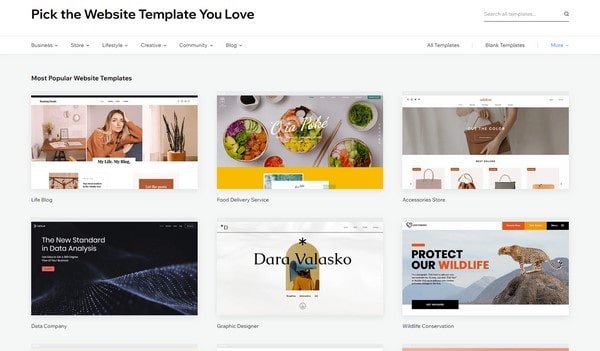
As mentioned above, Wix offers two editing approaches that target diverse user categories. Beginners will give preference to the Wix ADI tool, while web design pros will be prone to working in the standard editor of the system, which ensures deeper flexibility and unveils more freedom of design customization. At the same time, the second option may require a bit of coding. Keep that in mind, when making the final choice. Just like Zyro, Wix does not have a template switch option. You need to make a thorough template choice right from the start.
Artificial Intelligence (AI) Tools
Zyro positions itself as a contemporary website builder. Availability of built-in AI tools is the best proof of this statement. They aim to simplify and streamline the web development process, letting users create professional-looking projects without requiring extensive design skills or tech awareness. Let’s have a quick overview of the main AI tools included in the package here.
The advanced AI Writer tool helps users generate high-quality written content for their websites. It uses artificial intelligence to create engaging and multifaceted SEO-friendly texts like product descriptions, blog posts, content for landing pages etc. You just need to provide the desired topic or keywords and the AI will generate relevantly customized content.

The AI Heatmap tool analyzes user behavior on your website to provide insights on how visitors interact with your content. It helps identify high engagement areas like frequent users clicks, scrolls, or pages where users spend more time. This info can eventually be a valuable source for optimizing your project layout and design and layout for enhanced user experience.
When it comes to professional brand promotion, AI Logo Maker is certainly a must-have. It assists users in designing quality logos for their personal/business websites. To get one, you just need to input your company name and select the preferred style, features, elements and iconography. The AI will use the info to generate several logo designs to choose from. Likewise, you will be able to customize your logo to fit your brand identity.
Zyro also offers AI-powered image editing tools that include image resizer, background remover and image enhancer. These tools make it possible to edit and optimize images directly within the Zyro platform, without the need to look for external software.
AI Slogan Generator is another tool that will be indispensable for marketing experts and business owners. It helps come up with catchy brand slogans and taglines using the info submitted upon request. As a result, you will get a list of creative and unique slogan ideas that will perfectly represent your brand online.
Finally, the website builder lets you work with its Business Name Generator (when you need to make up a catchy name for your corporate website), Blog Title Generator (to create remarkable blog names) and Favicon Generator (to design an impressive and memorable website favicon).
Wix was one of the first website builders to start using Artificial Intelligence solutions to automatically create a personalized website design based on user preferences and information. Its Wix ADI tool is powerful and full-featured enough to create any website content, while everyone can use it with no coding required.

When you start working with Wix ADI, it will ask you a series of questions about your project implication, area of specialization, style preferences and preferred content. It will also request extra data like business name, contact details and social media profiles.
Based on this info, the integrated ADI algorithm will generate a customized website design that matches your preferences and industry. It takes into account your brand colors, fonts and images to produce a design that reflects your corporate identity.
The tool is also valuable when it comes to content creation. Based on the submitted data, it can generate text suggestions for different website sections like Homepage, About Us page, product descriptions etc. If you frequentl;y struggle with writing compelling content, this is really what you need.
Mind that Wix ADI creates responsive website design, but this doesn’t mean that you won’t be able to give a touch of personalization to it. Users have the flexibility to customize and modify the template with regard to their preferences. It is possible to edit and add elements, change colors and fonts, rearrange sections, using the power of the intuitive drag-and-drop editor.
Once the initial design is generated, you will gain full control over your website content and layout. The Wix ADI tool is designed to make website creation quick and simple for users with no tech skills. It automates the design process and provides a nice starting point for those who intend to create their own professional-looking projects.
General Pricing Comparison

Zyro pricing policy is quite affordable, considering the features, terms and tools included into its plans. Currently, the website builder offers 2 subscriptions to pick from. Here they go:
- Website (from $2.59/mo) – free domain for 1 year, free email for 3 months, 24/7 customer support, marketing integrations etc.;
- Business (from $3.59/mo) – all baseline features plus opportunity to sell up to 500 products, Stripe payments etc.
Zyro offers a risk-free 30-day money back guarantee. It also regularly rolls out special offers and discounts to let its subscribers save big, when picking the required plan. The prices specified on their website already include discounts and may vary. So, take your time to check them out before making the final choice.
Wix offers moderate pricing to adhere to the versatile needs of its subscribers. At the same time, the system boasts quite an extensive choice of plans. If you need to test the software or to practice your coding skills, you can use a free plan, which is everlasting and includes baseline functionality. To get access to more advanced features and to go live with a ready-made project, you will need to select one of the premium subscriptions. All of them fall into two packages. Have a look at them below.
Website Plans
- Combo ($22/mo) – no brand ad banners, 2GB bandwidth, free hosting, 3GB storage space, 30 minutes of video hours, free domain name connection, bonus for advertising in Google Ads for annual plans etc.;
- Unlimited ($27/mo) – 50GB storage space, 2-hour bonuses for advertising in Google Ads, unlimited bandwidth, apps for increasing productivity and traffic analysis etc.;
- VIP ($45/mo) – first priority support, professional logo maker tool, 100GB storage space, unlimited video, unmetered bandwidth etc.
Business/eCommerce Plans
- Business Basic ($27/mo) – online payments acception, unlimited bandwidth, 50GB on disk, 5 hours of video, free domain for annual subscriptions, analytics tools etc.;
- Business Unlimited ($32/mo) – special apps for entrepreneurs, integrated eCommerce platform, 100GB disk storage space, business development tools, 10 hours of video, built-in logo maker tool etc.;
- Business VIP ($59/mo) – unlimited bandwidth and video storage space, complete Wix Suite, priority support etc.;
- Enterprise ($500/mo) – advanced business solution that ensures complete project functionality and maximum toolset.
Wix has a 14-day money back guarantee and regular discounts. Thus, it is possible to save up to 50% of the initial plan cost, when opting for them from Tuesday to Thursday. The offer is viable on a weekly basis.
Which One Is the Best for SEO?

Zyro offers baseline settings, which are enough to adjust the major website optimization parameters. In fact, every Zyro website is SEO-optimized by default.

You won’t find any advanced tools here, but the system makes it possible to manually configure web page titles and descriptions. This concerns each web page your project includes. By optimizing these elements with relevant keywords and compelling descriptions, you can improve your website’s click-through rates and visibility in search results.
Zyro automatically generates an XML sitemap for your website. This helps search engine bots understand the structure and content of your website, making it easier for them to crawl and index your pages. As a result, your website pages will be discovered and indexed properly.
Finally, Zyro seamlessly integrates with Google Analytics and Google Search Console. These tools provide valuable insights into your project traffic, rankings, keywords and other important SEO metrics. The on-time analysis lets you make data-driven decisions for further website optimization.
Wix positions itself as a SEO-friendly website builder. And it’s really so. All the websites it powers generally rank high in the search engines.

The website builder realizes its SEO potential by means of SEO Wiz widget integration, which is done with a few clicks only. The widget makes it possible to control all the steps of your project optimization, providing detailed tips and guidelines.
What you can do here is filling out SEO fields, including meta tags for website pages etc. It is also possible to adjust redirecting tools, header tags, anchor links and Google analytics, if required. The software automatically generates the sitemap for its better indexing.
Wix enables you to create user-friendly URLs for your website pages. You can customize the URL slug for each page, making it more descriptive and keyword-rich.
Built-in tools for image optimization are available here as well. You can add alt text and descriptions to your images, which helps search engine bots understand their content and improve your project visibility in image search results.
The website builder includes canonical tags on each website page to indicate the preferred version of a page to search engines. This helps avoid content duplication issues and consolidates the ranking signals for similar pages.
If you need to change a website URL or consolidate multiple pages for some reason, Wix allows setting up 301 redirects. This helps preserve the SEO value of the original page when moving to another platform, for example. This also ensures that visitors and search engines are correctly directed to the new URL.
Just like Zyro, Wix integrates with Google Analytics to let you control and analyze the major website performance parameters, including user behavior, traffic sources, conversions etc.
To get access to advanced SEO tools and widgets, you can browse the App Market to pick suitable applications. These measures are effective when it comes to quality website optimization.
Key Differences Between Zyro and Wix
| Zyro | Wix | |
| Ease of Use: | Zyro is a simple and understandable SaaS website builder that comes with a standard set of features and tools. It works well for personal and business projects. Its use does not require any coding skills and web design expertise. | Wix is an easy-to-use DIY website builder, which works great for different types of commercial and non-commercial projects. The software targets beginners and web design pros, having much to offer to each user category. It ensures a smooth and intuitive registration process along with multiple features available in stock. |
| Functionality: | The platform comes with standard settings needed to launch a simple project. It offers a blogging engine, Online Store Manager app, built-in widgets, AI tools, video and Google Maps integration and other features. | The software is powerful and feature-rich. It grants access to multiple tools/features provided by default. The system includes built-in blogging/eCommerce engines, numerous business, SEO and marketing tools, professional Wix Ascend platform for entrepreneurs, Wix Marketplace, Logo Maker, App Builder, App Market, multi – language support and other high end tools. |
| Design: | The system has a rich collection of templates divided into categories. They are free and responsive by default. Mobile and desktop preview modes are available here as well. The website builder does not have a template switch option. | The website builder includes one of the most stunning, rich and versatile collections of themes. It currently encompasses over 800 designs. They are free, customizable, mobile-optimized and divided into categories. A preview option lets you see the project before publication to be able to make the required edits. Wix offers two editing options – Wix ADI tool and Standard Editor. The system does not allow switching between the templates. |
| eCommerce: | The software offers a handy Online Store Manager that lets you set up web stores of any size. The only nuance is that the app is integrable and users have to switch between a standard dashboard and an eCommerce panel when customizing their digital stores. | Wix comes with a powerful eCommerce engine. It allows setting up small/medium online shops by means of integrating a Wix Stores widget. The app lets you create and update product collections, set up show window parameters, add sales lists etc. It is also possible to add media files, video reviews, enable user comments, and configure SEO settings here. |
| Blogging: | The system allows creating simple blogs without the need to create separate pages or sections. Activation of the “Blog” lets you connect a ready-to-use blog section to further customize it to your liking. | Wix boasts an advanced blogging platform. The system also has a separate category of blog templates that refer to various niches. Users can add and edit posts, schedule new publications, enable a commenting feature, set up SEO settings for better project promotion. |
| Small Business: | With Zyro, you can launch small business websites. The system has everything to complete the task – customizable business templates, AI tools, editing solutions , blogging/eCommerce platforms and a number of integrations to use, if required. | The system works great for small business website creation. Along with mobile-ready business themes divided into niche categories, the platform lets you choose high end third-party integrations available in its App Market. Special attention should be given to the Ascend Platform, which delivers marketing and promotion tools to get started with any business project. |
| Pricing: | The website builder offers 4 premium subscriptions. Their cost starts at $2.59/mo, although the prices may vary with regard to the discounts the system has. There is also a 30-day money-back guarantee here. | Wix pricing policy is cost-effective and suitable to everyone. There is a free plan to test the system and to improve your coding skills. To go live with your project, you have to upgrade to a premium plan. The available subscriptions are divided into 2 packages – a Standard and a Business/eCommerce package. The cost starts at $22/mo. |
| SEO: | Zyro SEO parameters are quite baseline. Users can only update web page titles and descriptions here. The settings are applied to all website pages. | Wix presents itself as a SEO-friendly system. Proper optimization of website pages for the search engines is done by means of SEO Wiz widget integration. There are also numerous SEO and stats tracking extensions available in the App Market. |
| Customer Support: | 24/7 customer support for premium plan users, email and live chat for paid subscriptions, Feedback PopUp tab. | Powerful Knowledge Base, forum, FAQ section, Help Center, email, ticketing system, VIP support, Live Chat. |
Comparison Conclusion: Which One Is Better?
When it comes to choosing between Zyro and Wix, you shouldn’t face any difficulties. Everything is obvious right from the start. Both website builders can be used to set up and customize personal and business websites. They come with blogging and eCommerce engines, a set of design customization tools, SEO settings and various pricing options. As you get closer to their details and special characteristics, you will notice that Wix prevails over its competitor in terms of functionality and customizability.
Wix has distinguished itself as a powerful and the most popular web design platform in the modern web design market. Its toolset, integrated features, design customization options and pricing solutions are above average. Websites launched with the system rank high in the search engine results, standing out from the crowd due to their high end performance and design. As opposed to it, Zyro offers baseline functionality, which is sufficient to launch simple projects only. Thus, Wix is a distinctive leader of this comparison that does not have rivals in the contemporary niche.


