

Contemporary web design niche offers many trusted platforms to get started with your online project. They all differ in integrated functionality, customizability, target audience and specialization, but most of them provide all-in-one solutions for launching and hosting websites. This eliminates the need to look for third-party hosting companies, which is a notable advantage for non-techies. Squarespace and GoDaddy are two recognizable systems that offer web hosting and management solutions all in one pack. However, they still vary in the features and tools used for this purpose.
Squarespace is a credible and world-known website building software, which has made a name for itself due to the abundance of easily customizable templates, intuitive WYSIWYG editor, mobile responsive design, and some other features. Although it was mainly launched as a builder for content-based sites, it offers baseline eCommerce functionality in addition to its hosting and domain registration services.
GoDaddy is a renowned platform, which was initially introduced to the market as a hosting provider. However, it has quickly evolved into a quality DIY website builder, which also offers an opportunity to host a ready-made website. Some major features of the software include simple third-party integration, customized templates, a wide selection of stock photos, etc.
In today’s Squarespace vs Godaddy battle, we are to highlight some of the main pros and cons of these systems. This will help you define, which of the two website builders works best for your web development needs and which of them has more to offer. Let’s get started now.
General Overview

Squarespace occupies one of the leading positions in the modern web design market. The system targets newbies yet it still has much to offer to web design pros. As the all-in-one platform, it lets the subscribers create and host all types of projects on its servers. Squarespace works best for professional portfolios, blogs, small and medium web stores as well as small business websites. What’s important, you don’t have to master programming nuances to work with the service due to the intuitive and understandable web design approach it offers to everyone.
Created in 2003, Squarespace has notably extended its functionality, which has correspondingly affected its client base. According to statistics, the number of websites the platform powers has reached 4,341,984 projects and that’s not the final result. Many more websites are currently under construction. The website builder is known due to its convenience and simplicity that do not compromise with affordable cost and flexibility.
GoDaddy has distinguished itself as a feature-rich DIY website builder and a trusted hosting/domain provider. The platform works best for starting all types of websites for personal and commercial use. These include small business projects, digital stores, blogs, landing pages etc.
The platform has been delivering its services since 1997 and it has grown into one of the most popular hosting providers since the time of its creation. Currently, its customers may also access the platform’s website builder that lets them build professional websites in less than 1 hour. Recent estimates have shown that over 17,298,071 web projects have been developed with GoDaddy. That’s definitely an impressive number!
Squarespace and GoDaddy both offer website development and hosting services. They have gained user popularity due to simplicity and powerful integrated functionality. Squarpsace, however, targets all user categories, while GoDaddy is a better solution for proficient web designers.
Which One Is Easier to Use?

Squarespace ensures a fast and easy website building process. It was designed for newbies without any technical background. You don’t have to waste much time to sign up for the service as it has a built-in automated assistant, which helps you decide on the preferred website structure and the most suitable template. Just complete several quick steps, pick the goals you pursue and watch the solutions the website builder generates.

The system comes with a drag-and-drop editor and a handy WYSIWYG web design approach, which lets users create any page structure they want. Moving elements and blocks is very easy. You are free to rearrange them, replace or re-order with just a couple of moves. Content/media files submission is easy and understandable here as well.
Squarespace provides several ways for customers to stay in touch. There is a live chat and email support here, which are available round-the-clock. The company also offers multiple video guides, tutorials and articles that cover various issues. Users will also find a range of blog posts that may come in handy.
GoDaddy claims to help newbies build their sites in less than 60 minutes. The software is simple and straightforward, although, it still lacks customization features. Users are obliged to follow automated prompts from the very beginning and up to the “publish site” stage. GoDaddy does not provide enough room for maneuvers.

Due to the drag-and-drop editor, the website builder is a nice pick for non-coders. To start a mobile-friendly website with the service, you just need to register for an account, pick a template and use the tips provided by the system wizard to complete the must-have steps. An integrated WYSIWYG editor lets you track the edits you make when customizing the project. This reduces the risk of making mistakes.
Another downside of the website builder is that its homepage is a bit oversaturated with elements, content blocks and sections. This might be a problem for first-timers, who will have to invest extra time to master the platform.
As to the ease-of-use, Squarespace proves to be a simpler web design solution, especially for beginners. It is intuitive and convenient for everyone, offering simple tips for an effective website management process. GoDaddy, in its turn, lacks customization freedom and it’s also not quite easy to explore for beginners.
Design and Flexibility

Squarespace and GoDaddy can be applied for a broad range of web design tasks and objectives. They come with rich integrated functionality and design customization tools that make it possible to start and manage feature-rich projects. Each system, however, has a set of special parameters that may affect user choice. To define, which platform has more to offer and which of them complies with your individual web design requirements, it makes sense to review and compare some of the major features.
eCommerce
Squarespace has a powerful built-in eCommerce engine that provides some of the baseline options out of the box. The website builder lets you run small and medium digital stores, using the tools available in stock. You may integrate a shopping cart, create product galleries, add/manage items you intend to offer for sale, add their descriptions, prices, videos and photos. All in all, it is possible to add up to 100 SKUs/ product variations The platform additionally offers some eCommerce extras designed for dining venues and coffee shops. To drive user attention, you can introduce special offers and discounts, if required.

The website builder has a stunning collection of eCommerce templates designed for various niches. Just pick the one which adheres to your business needs and reach the available toolset to start a web store. With Squarespace, you can connect the SSL Certificate to your project for enhanced security, which is a must-have for any eCommerce website. Likewise, it is possible to adjust currency parameters, pick a suitable payment gateway for your project etc.
GoDaddy has eCommerce capabilities as well, but they are quite limited and viable for commerce plan users only. The subscribers may customize the product page, change its fonts or colors, create and update product galleries, upload photos and description of items available in stock, fine-tune shipping and tax settings, integrate delivery inventories (for example, UPS), enable customer testimonials, send personalized offers, promotions, and emails. Additionally, you can adjust shopping cart parameters, shipping/tax settings as well as social media and marketing features.
Speaking about eCommerce, Squarespace definitely occupies the top position. The website builder has a strong eCommerce focus that guarantees an effective and convenient web store creation process. As opposed to it, GoDaddy lacks eCommerce flexibility, although, building a mediocre digital store with it is also possible.
Blogging
Squarespace also has a functional and powerful blogging engine. It lets you start and run a feature-rich blog to enhance user communication and the involvement into your business info. When managing a blog with the system, you can add and edit posts, schedule new publications, integrate media files. To let users communicate with each other, it is possible to enable the commenting feature here. The website builder also has a collection of templates that work great for blogging purposes. If you already have a blog created with another niche platform like Tumblr or WordPress, for example, you can transfer it to Squarespace to keep managing it here.

GoDaddy offers mediocre blogging functionality, so, don’t expect a lot from it. The feature lets you create separate blogs with articles and images, yet it lacks baseline functionality to create tags or integrate RSS feed. No SEO settings are available to optimize blog posts as well. What you can do here is working with the image editor, when adding/managing new posts, customizing blog design, organizing the content etc. It is also possible to enable the communication option here. One of the advantages of the system is its BYOW (Bring Your Own Blog) feature, which allows linking the existing blogs on other platforms to your new GoDaddy project.

When it comes to blogging, Squarespace is also on the top of the list. The system has a powerful blogging engine, which lets you connect a blog to your project. GoDaddy has this option as well, but its blogging functionality is far from ideal.
Third-Party Integrations and Special Features
Squarespace offers a list of typical add-ons, which contribute to its functionality. They include some galleries, basic contact forms, widgets for photo collections, social sharing buttons and eCommerce tools for restaurant and cafe projects. The selection of add-ons is not as extensive as compared to those available in App Markets. You may require more apps and integration capabilities depending upon your website specialization. In addition, users have a chance to integrate the site with Google Analytics to control its major parameters and statistics.

One of the highlights of the website builder is its Unfold App – an advanced storytelling tool that lets you create and share attention-grabbing posts in social networks. The app is available for download in the App Store and Google Play Store absolutely for free. Do you need a unique website logo for professional brand presentation? Then go ahead to use an integrated Logo Maker to design a personalized logo for your project. The process is easy and quick – just provide your business name and pick some of the required elements to independently create your logo style.
GoDaddy does not provide much flexibility as it offers quite a straightforward web design process. You won’t encounter much room for creativity here yet the website builder still grants access to a baseline selection of add-ons and features to give your project a touch of personalization. Mind that the system does not have an integrated App Store, which is a notable demerit. When managing your website, you will be able to add it to Google AdSense to control its statistics, but this is not enough to launch a feature-rich project with the system.
As to advantages, GoDaddy comes with a high end Website+Marketing feature, which allows using a set of marketing tools for effective website promotion. Additionally, the website builder offers an email marketing feature, social media promotion tools, Yelp Business Listing, Google My Business as well as built-in GoDaddy In Sight tool, which ensures quality business optimization.
When it tackles the issue of integrations, Squarespace somewhat prevails over GoDaddy. Although both systems don’t have integrated App Markets, Squarespace still offers more add-ons and widgets that add to its functionality. GoDaddy is known for its marketing tools, but it definitely lags behind its competitor in terms of integrations.
Template Editing
Squarespace offers a selection of mobile-friendly themes that look awesome. Professionally designed, they look stylish and up-to-date following the latest web design trends. Users may choose from over 100 available layouts here that are sorted out by categories to simplify users choice. What’s important, the website builder pays much attention to template quality and it also allows for code editing. This will be an advantage for web design experts, who wish to get the most out of their website presentation. Mind, however, that code editing feature is available for Business Plan subscribers only.
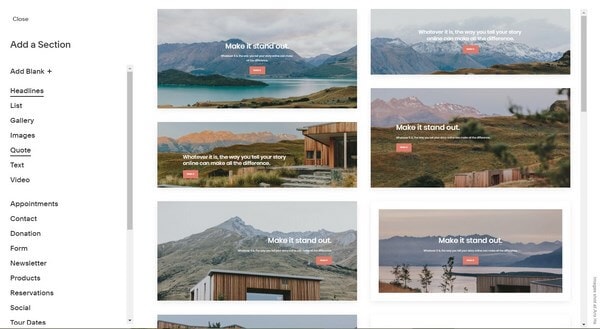
The website builder has a Cover Page Builder – a perfect tool for users, seeking an opportunity to design appealing landing pages or one-page websites. The tool grants access to 29 pre-designed layouts you can customize to your liking, when designing a unique cover page for your website.
Likewise, Squarespace has a built-in Page Editor, which mainly targets newbies. It guarantees an easy and intuitive web design process, letting you pick and add extra blocks/elements from the available list. To enhance your project design, you can use integrated typography tools as well as visual/animation effects to create the one.
GoDaddy does not boast a huge selection of themes. It currently offers about 20 templates yet you won’t find any tools to modify the themes here. There is no style editor to work with template colors or fonts. You will not be able to change styles or backgrounds as well. All you can do is remove some of the on-page elements or add new ones. That’s it. As for the templates, they look pretty good and run smoothly on desktop and mobile devices. However, you will just be able to work with basic design settings available in the dashboard.

The website builder grants access to a simple and understandable Editing tool to ensure easy website customization. There are various elements and blocks you can use here when creating new pages and sections and the system also provides access to the HTML-element feature. The latter option will come in handy to code-aware users, making it possible for them to add JavaScript and HTML elements to your project.
In terms of template editing, Squarespace has more to offer. Its collection of templates is quite extensive, while design quality is far beyond the average. The system also has an integrated Page Editor and a Cover Page Builder that help you get the most out of your project appeal. Even though, GoDaddy also offers code editing options, it still lacks design customization tools.
General Pricing Comparison

Squarespace won’t let you create websites on a free plan, but you can test the available features during the 14-day trial. The system doesn’t require any credit card data to sign up for an account. As soon as the trial comes to its end, you will be offered to upgrade to one of 4 premium subscriptions. Here they go:
- Personal ($12/mo billed annually) – 2 contributors, integrated website metrics, SSL Security, 24/7 customer support, unlimited bandwidth and storage, free custom domain, SEO features etc.;
- Business ($18/mo billed annually) – unlimited contributors, CSS/JavaScript design customization, professional email from Google, 3% transaction fees, advanced website analytics, premium blocks and integrations, fully-integrated eCommerce etc.;
- Basic Commerce ($26/mo billed annually) – domain checkout feature, customer accounts, Instagram synchronization, powerful eCommerce analytics etc.;
- Advanced Commerce ($40/mo billed annually) – abandoned cart recovery, APIs for order and inventory, gift cards, advanced shipping and discounts, limited availability labels etc.
GoDaddy also has a free trial, the duration of which constitutes 30 days. Likewise, the website builder offers 4 premium plans to choose from. They are as follows:
- Basic ($12.95/mo) – responsive templates, 24/7 customer support, SSL Certificate connection etc.;
- Standard ($16.95/mo) – 20 social posts/responses per month, 3 social media listing platforms SEO parameters;
- Premium ($24.95/mo) – free ad credits for Google, Yelp and Bing, unlimited media listing platforms per month, unlimited social posts/responses per month, email/text appointment reminders;
- Commerce ($29.95/mo) – eCommerce features, coupon codes and discounts.
Each plan implies domain name connection available at extra cost. Prices may differ with regard to the selected subscription.
Speaking about pricing, website builders offer moderate costs that are quite similar. They have free trials to let the potential subscribers test the entire range of integrated features. GoDaddy, however, charges extra fees for domain name connection. This is what makes its competitor, Squarespace, a better solution for most users.
Which One Is the Best for SEO?

Squarespace offers baseline SEO capabilities, making it possible to manually adjust the required settings for all website pages. Among the parameters you can fill out here, it makes sense to mention major product configurations for online stores and meta tags for website pages. A notable advantage for beginners is the availability of the SEO checklist, which helps you track the settings you should make for proper website optimization. If there is still something you don’t understand about your website SEO aspects, Squarespace unveils an opportunity to consult the software experts, who will help you pick the best strategy for your project SEO.
GoDaddy comes with a powerful integrated SEO Wizard that helps all user categories explore the available parameters and independently adjust the required settings. The wizard provides tips on how to properly edit meta titles and descriptions. The negative feature, however, is that the website builder itself comes with an extraordinary heading placement that is far from being SEO-friendly. Search engines might not appreciate it. Likewise, the system does not include integrated stats collection tools, making it impossible to track your project performance and must-have data. You can add Google Analytics on your own, but you may require extra knowledge to do that.
When reviewing the SEO aspect, Squarespace offers a smarter approach to picking the best strategy for your project optimization. The system allows adjusting your website SEO parameters on your own and it also offers a checklist to control the process. GoDaddy also has an integrated SEO Wizard, but it still cannot be called a SEO-friendly website builder due to the absence of must-have features.
Key Differences Between Squarespace and GoDaddy
| Squarespace | GoDaddy | |
| Ease of Use: | Squarespace is a DIY cloud website builder that comes with drag-and-drop editing options. It allows starting and customizing different types of websites for commercial and non-commercial use. No coding skills are required to work with the system. | GoDaddy has become popular both as a website builder and hosting provider. The software builder is quite simple for each user, offering an intuitive interface that contributes to easy and fast system exploration. |
| Functionality: | The platform comes with an easy WYSIWYG editor, blogging and eCommerce engines, Logo Maker and multiple social integrations etc. When starting a project with the system, you can use a high end Cover Page Builder, stats tracking tools, Style Editor, Google Maps embedding feature, Unfold App and other highlights. | The software has a set of built-in features required to start a quality project. It allows running websites for personal and business application. GoDaddy has built-in blogging/eCommerce engines and quality integrable widgets. Special attention should be devoted to its high end marketing tools like Website+Marketing tool, Google My Business, In Sight tool, Yelp/Bing listing feature etc. |
| Design: | Squarespace offers an extensive collection of free, responsive and customizable templates. There is access to high end design customization tools, Logo Maker, Image and Style Editors etc. | GoDaddy design collection is quite limited, but all the themes are mobile-ready and customizable. Search filter and preview options are available here as well to simplify the choice. |
| eCommerce: | The software has a strong eCommerce engine. It lets you run small/mid-size online stores to sell physical/digital services/products. | The system has a built-in eCommerce platform. It allows constructing and managing small/medium web stores, although, the integrated feature set is quite limited here. |
| Blogging: | With Squarespace, you get an opportunity to connect a feature-rich blog to your website. The integrated blogging engine lets you post, schedule and edit publications as well as set up blog design and special parameters. | The website builder offers baseline blogging functionality, which is insufficient to start a feature-laden blog. |
| Small Business: | The website builder works great for small business website development. Availability of widgets, integrations, Unfold App, media files and with statistics tracking tools makes the software a worthy pick for your commercial project. | GoDaddy is a nice solution for business websites. Apart from niche designs, it unveils an opportunity to use its Website+Marketing feature and other tools for effective business promotion. |
| Pricing: | Squarespace comes with a free 14-day trial and 4 premium subscriptions. Their cost starts at $12/mo. | GoDaddy has a 30-day free trial and 4 paid plans. The pricing policy is quite moderate and starts at $12.95/mo. |
| SEO: | Squarespace is a SEO-friendly website builder, which lets you start projects that rank high in the search engine results. The website builder allows filling out the major SEO parameters and there is a checklist to control the process completion. | GoDaddy comes with an integrated SEO Wizard. It allows setting up project optimization parameters. However, the system lacks stats tracking tools, which triggers the necessity to connect Google Analytics. |
| Customer Support: | 24/7 Live Chat, Community Forum, Email Support, FAQ section. | 24/7 customer support, FAQ section, extensive knowledge base, phone and live chat. |
Comparison Conclusion: Which One Is Better?
Choosing between Squarespace and GoDaddy is no problem, if you aim at starting a full-featured project. The website builders both make it possible to run different types of projects and they both serve nearly the same purpose. As you dive deep into details, you will realize that Squarespace notably prevails over its competitor. This mainly concerns the integrated functionality of the platforms, and their design customization options.
GoDaddy is good for fast deployment with no special project requirements. As opposed to it, Squarespace has powerful blogging/eCommerce options, small business management tools and a more extensive set of features to choose from with regard to your website specialization. This lets you start a project that differs from typical ones.


