

About 150K projects across the globe went online thanks to Mobirise, a popular solution for site-building and web design. No wonder. Mobirise has enough advantages. Among them are a free, open-source builder, ease of use for non-coders, extended integration options, basic eCommerce features, and advanced landing page building tools.
However, the builder lacks several first-priority features, plus it makes you pay for Mobirise Kit, does not offer hosting, and has other inconveniences. Are there good alternatives to Mobirise? Of course, there are plenty of them, and in this review, we’ll introduce the best ones.
HostGator – Get a Fully-Equipped Website Fast

| Product Name: | HostGator |
| Official Website: | hostgator.com |
| Number of websites: | 2,135,373 |
| Complexity: | Easy |
| Mobile Optimization: | Yes |
| Free plan: | Yes |
| Paid plan: | From $3.75/mo |
The HostGator is the fastest and the most secure analog of Mobirise that additionally offers website hosting opportunities. It offers a range of features which can serve as an alternative to Mobirise, a website building platform. While the primary focus of HostGator is web hosting, it also provides tools and services that can help in building and managing a website, which may suit the needs of users looking for alternatives to Mobirise.
Features

HostGator allows building and hosting a website for you in minutes and it can be as functional as you wish. The main features the host provides include free hosting, free and custom domain options, SSL Certificate connection, opportunity of one-click WordPress integration, website migration, unlimited image storage space etc. Apart from that HostGator comes with loads of eCommerce features like online payments, digital product downloads, inventory management tools, integrated shipping management, discounts, coupons, booking, checkouts, tax calculations, etc.
Besides all this, you’ll get unmetered bandwidth and CDN website connections, no matter which plan you choose. Since you’ll deal with one of the strongest hosts in the industry, you may not doubt the high uptime, strong SEO settings, and mobile responsiveness of your website. HostGator offers comprehensive 24/7 support.
Design
HostGator does not have a collection of built-in templates as this is not a website builder. However, it allows installing WordPress or other CMS and getting access to themes available both in their official repository and online. There are hundreds of designs you can choose from – both free and paid. All in all, the system employs the best techs to create professional and visually appealing designs. You’ll only need to customize colors, fonts, and navigation options, and add your content.
Pricing
The site builder has three plans: Hatchling Plan ($3.75/mo), Baby Plan ($4.50/mo) and Business Plan ($6.25/mo). Even the cheapest package includes all the vital features and freebies your website might need.
The Business Plan has more extended options like the opportunity to host 3 websites, domain privacy and free daily backups for the first year, 40GB SSD storage space etc. If you plan to set up and host a website at a time, then you should consider getting a separate subscription for WordPress. They start at $5.95 per month.
WordPress – Create a Unique Website

| Product Name: | WordPress |
| Official Website: | wordpress.org |
| Number of Websites: | 30,462,105 |
| Complexity: | Complex |
| Mobile Optimization: | Yes |
| Free plan: | Completely free |
| Paid plan: | Paid themes, plugins |
If an inimitable design is the #1 priority for you, and you’re ready to spend a certain time writing the code, then WordPress is the best option for you. Like Mobirise, the platform gives free access to its open-source code. However, your customization freedom and plugin choice will be much more extended.
Features

WordPress is the top choice for millions of users. Its main feature and the key advantage is the highest level of integration capabilities. The platform offers over 55,000 plugins for various purposes. You can connect everything to your WordPress website, from blogging tools to special eCommerce plugins.
Here, you need to connect a custom domain and choose a host. Both tasks can be easily performed with HostGator or another host. You also should take care of SEO and security settings. At your disposal will be a broad range of apps to complete this mission and finally create your unique website.
Design
Today, WordPress offers over 10,000 free and premium themes, which you can use to define your website’s design. You are free to work out your own theme from scratch as well.
That is, WordPress sets no limits to your design creativity, and you can build truly magnificent websites if you know how to code or can afford to hire a WordPress web design professional.
Pricing
WordPress (we mean the self-hosted variant) is a free platform. Yet, building a website with its help can cost you a pretty penny. You’ll need to pay for hosting and domain, as well as for premium themes and advanced applications.
Hostinger Website Builder – Enjoy the 2-in-1 Solution
| Product Name: | Hostinger |
| Official Website: | hostinger.com |
| Number of Websites: | 53,643 |
| Complexity: | Average |
| Mobile Optimization: | Yes |
| Free plan: | Unlimited |
| Paid plan: | From $2.79/mo |
Unlike Mobirise, Hostinger offers a site builder and hosting services in one plan. The company is a solid player in the hosting arena. Its website builder is an easy way to make a fast-loading site for whatever purpose.
Features

The Hostinger website builder enables a simple building process. While creating an online presence for your projects with the help of Hostinger, you can benefit from the following features: a Drag & Drop editor, up to 100 websites, unlimited traffic, up to 500 products, 20+ online payment gateways, order & inventory management tools, Google Analytics, the AI Heatmap and AI Writer tools.
This is not the best solution for a complex eCommerce website. However, Hostinger can perfectly suit individual projects and small/medium-sized businesses.
Design
No coding knowledge is needed to create a website on Hostinger. The process starts with your choice of a template. The platform offers dozens of them.
The templates are responsive and professionally designed. They are grouped into Landing Pages, Portfolios, Blogs, etc.
Hostinger also offers an AI Logo Maker and a bank of royalty-free images. Your customization options will be limited enough. Yet, such limitations are characteristic of all builders with a Drag & Drop editor.
Pricing
There’s one Hostinger plan that includes a site builder and hosting. Its month-to-month price is $11.99. The package includes a free domain for one year, free email, and an unlimited SSL certificate.
SITE123 – Create a Simple Website with Ease

| Product Name: | SITE123 |
| Official Website: | site123.com |
| Founded: | 2015 |
| Number of Websites: | 27,209 |
| Complexity: | Easy |
| Free plan: | Yes |
| Paid plan: | From $10.80/mo |
Launched in 2016, SITE123 represents a fresh approach to site building. The platform is addressed to non-coders who need to get their website urgently. You cannot expect your SITE123 website to be complex and feature-rich, but it’ll be fast-loading and have excellent SEO. The site builder has a free version.
Features
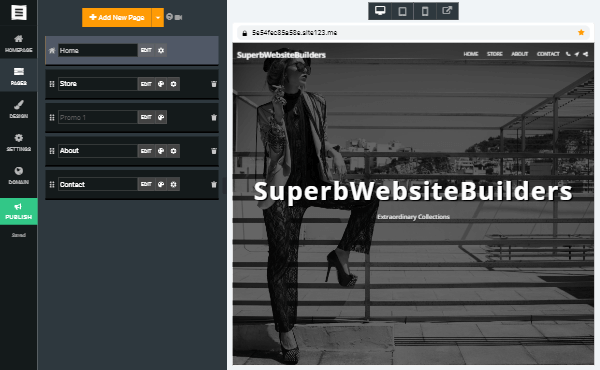
The feature set on SITE123 depends on your choice of plan. You’ll only get prime necessities if you opt for the free or the cheapest plans. However, even then, the SITE123 site builder will give you a very simple building process, basic tools for selling goods, excellent SEO and loading rate, a 1-year free domain, and 10+ Gb storage.
SITE123 can be a light start for your project. It’s a great opportunity for simple individual projects. As to businesses and online stores, the builder’s most expensive plans can only suit them – if they do not plan complex eCommerce.
Design
SITE123 offers the simplest building process possible. So, you can build a website for whatever purpose fast by using one of the 180+ templates offered on the platform. Do not expect a diversity of designs from them. Still, these are professional-looking themes with good responsiveness.
Although all themes look pretty similar, you can customize their colors, fonts, etc., to add originality to your website. In almost every template, you’ll have three choices of block arrangements and button layouts.
Pricing
SITE123 offers a free plan and four paid ones. The free version is too limited and goes with SITE123 tags. The cheapest two packages (Basic, $7.80/mo and Advanced, $13.80/mo) will also suit only websites with truly simple needs. The Professional ($19.80/mo) and Gold ($25.80/mo.) plans are good for small businesses and online shops.
Squarespace – Launch a Powerful Online Store
| Product Name: | Squarespace |
| Official Website: | squarespace.com |
| Founded: | 2003 |
| Number of Websites: | 2,536,744 |
| Complexity: | Medium |
| Free plan: | No, free 14-day trial |
| Paid plan: | From $12/mo |
Squarespace is a modern site builder for creating professional websites easily and fast. Its strongest point is an excellent choice of templates. You can launch a blog, a portfolio, a business website, an online store, and whatever.
Features

Squarespace is helpful for various users. It offers different solutions to non-commerce individuals, businesses, and online stores. However, any plan from Squarespace will include unlimited bandwidth, an SSL Security option, 2 contributors on the cheapest plan and unlimited contributors on all the other plans, the Custom Merch package to manage your products, Squarespace Extensions to add functionality to your website, and good SEO tools.
If you are aimed at selling products online, you can upgrade to eCommerce plans. They go without transaction fees and include vital features like online/offline payments, POS, etc.
Design
Squarespace templates are exceptional. You can apply any of the 110 beautifully-designed themes equally accessible in all the platform’s plans. Squarespace offers a handy menu where all templates are grouped into categories like Online Store, Food, Entertainment, One Page, etc.
The simplest way to create your website’s design is through the Squarespace Drag & Drop editor. Surely, you won’t have too much freedom in customizing templates with this option. However, you can add any changes thanks to free access to custom code – in case you know how to code.
Pricing
There are four plans on Squarespace. The Personal plan available at $23 a month will suit individual websites with few requirements. The Business plan ($33/mo) is a more extended package, but it’s still insufficient for full-power eCommerce. If this is what you plan, opt for one of the eCommerce packages, eCommerce Basic ($36/mo) or eCommerce Advanced ($65/mo).
IONOS Website Builder – Create the Business Website You Need

| Product Name: | Ionos |
| Official Website: | ionos.com |
| Founded: | 1988 |
| Number of websites: | 306,989 |
| Complexity: | Medium |
| Free plan: | No |
| Paid plan: | From $1/mo |
There are two ways to create a website on IONOS: you build your website with the help of the IONOS website builder (MyWebsite Now), or the IONOS site builder creates your website for you (MyWebsite Design Service). Both methods are simple. The platform offers well-arranged plans and is famed for its super-catchy introductory prices.
Features

IONOS has solutions with or without online store functionality. Common features for all packages include:
- 100+ professional templates and 10+ Gb storage (unlimited in Pro);
- 10+ pages (unlimited in Pro) and 1-year free domain;
- a photo bank with 17,000+ free images;
- eCommerce tools for online payments and social media marketing (in online store plans);
- MarketingRadar to track your competitors on social media and Google.
With any IONOS plan, you’ll get SEO-ready, responsive websites with proper security settings ensured by the Wildcard SSL certificate. The more powerful website you wish, the more likely you’ll need a more expensive solution from IONOS with a more extended feature supply.
Design
MyWebsite Now is the IONOS site builder you can use to create your website with your own hands. There’s nothing complicated here since the builder is Drag & Drop-based and requires no coding knowledge.
IONOS offers loads of templates designed for specific businesses like restaurants, photo/video services, real estate agencies, and such likes. On the cheapest plan, your design freedom will be very limited. At your disposal will be 18 templates with limited customizations. Starting from the Plus plan, IONOS will give you access to all its templates with the ability to mix their blocks and elements.
You can also use MyWebsite Design Service, and the IONOS expert team will turn your website project into reality. Code manipulations can be included.
Pricing
You can subscribe to one of the three plans for both MyWebsite Now and MyWebsite Design Service. Each MyWebsite Now plan goes with an online store addition. In total, there are nine subscription variants on the platform.
MyWebsite Now Plans: Starter ($9/mo) and Starter + Online Store ($19/mo); Plus ($15/mo) and Plus + Online Store ($25/mo); Pro ($25/mo) and Pro + Online Store ($50/mo).
MyWebsite Design Service: Design Service S ($30/mo), Design Service M ($45/mo), and Design Service L ($60/mo).
If you are ready to pay for 6-12 months at once, expect beneficial discounts from IONOS. Thus, you can subscribe to the Plus plan for one year and pay as much as 1 dollar per month during this period.
Wix – Build Any Site You Wish Easily

| Product Name: | Wix |
| Official Website: | wix.com |
| Founded: | 2006 |
| Number of Websites: | 4,565,423 |
| Complexity: | Very easy |
| Free plan: | Yes |
| Paid plan: | From $13/mo |
Wix is a top-rated site-building solution. It is often compared with WordPress and represents a much easier-to-use platform. Although it cannot compete with WordPress in the number of themes and plugins, Wix is a truly workable website builder with beginner-friendly options.
Features

Take Wix as a simpler alternative to WordPress and a more advanced alternative to Mobirise. The most important features of Wix are three ways to build a website, 800+ templates, the Wix Stores solution, Ascend by Wix – a set of tools to manage business projects, good SEO tools, Wix Video Maker, and Wix Marketplace for Wix users selling/purchasing their Wix apps and services.
As to eCommerce options, you can expect to get a variety of instruments, from social media widgets to shipping management tools. Wix is difficult to migrate from, and the process of changing templates may be tricky here. Still, the platform is worthy because of its multiple instruments.
Design
Cannot code? No problem! Wix offers two simple editors, Wix Editor (based on Drag & Drop) and Wix ADI (fully AI-powered.) The former variant will let you build a quick site by choosing a template. You’ll need to make some design edits and connect the necessary apps to it.
The ADI Editor will only require that you describe the website you need and build it for you itself. You can do without any customizations while using this way. However, if a unique design is what you need, Wix will let you make all the necessary HTML/CSS edits.
Pricing
Wix offers a diverse system of plans. There are four solutions for website projects and three solutions for business projects.
Wix Website Plans come with Combo ($16/mo), Unlimited ($22/mo), Pro ($27/mo), and VIP ($45/mo). Wix Business Plans offer Basic for $27/mo, Unlimited for $32/mo, and VIP for $59/mo.
All Wix plans offer good value for money.
Google Website Builder – Launch a Simple Website for Free

| Product Name: | Google Sites |
| Official Website: | sites.google.com |
| Founded: | 2017 |
| Number of Websites: | 757,147 |
| Complexity: | Easy |
| Free plan: | Completely free |
| Paid plan: | - |
Google Sites can also be a good alternative to Mobirise for those users who need a fast and free site-building solution. The site builder is great for collaborations and integration with Google instruments.
Features

Google Sites won’t suit anyone. However, this is a great option for you if you appreciate the following features:
- a entirely free site builder;
- ease of use – no code skills are necessary;
- unlimited contributors;
- social network links;
- integration with all Google products, including Google Analytics.
Google Sites is not a good choice for eCommerce projects since the platform cannot be connected to side apps, payment gateways and shopping carts included. Yet, for small businesses and non-commercial organizations, this is a fast and secure way to build a working area fully equipped with Google instruments.
Design
Google Sites cannot boast a diversity of designs. However, all templates are professional and responsive. You can pick a suitable option quickly, customize it a little, and here you are – your website is ready to be published.
Another site-building method available on Google Sites is via code edits. You can build your website’s design from scratch by modifying the code. The platform offers several form templates and supports Google Sheets, Google Presentations, and Google Docs. You can add images and connect your website to your Google Disc storage.
Pricing
Google Sites is a free platform. You may only need to pay for specific Google apps like Google Ads or Google Analytics.
Conclusion: HostGator is the #1 Alternative to Mobirise
Each of the site builders introduced in this review can become a workable solution for your project in this or that situation. However, if you’re searching for an effective and secure platform with all options included, opt for HostGator.
HostGator allows creating and hosting complex websites within several hours. You can choose from several hosting packages with regard to your current budget. What is of no small significance here is that you can get all this for more than a reasonable price today!


