

Duda and Squarespace are cloud website builders, which do not occupy top positions in the list of the most popular web design platforms. At the same time, the systems cover a notable amount of users’ web design needs, having much to offer to all user categories. They make it possible to set up and manage quality web projects, using diverse approaches to the process of website development and customization.
Duda – is a drag-and-drop website builder, which comes with a set of design customization tools and features needed for successful website project startup. The system ensures a smooth and convenient web building process, being a good choice for first-timers and web design experts. It can be chosen to run websites for business and personal use.
Squarespace – is a cloud website builder, which comes with a set of tools required for professional design customization. The system is initially a good pick for portfolios, blogs and small eCommerce websites, but it can also be applied to design other types of projects.
So, which service is a better choice? Which of them offers more distinctive and feature-rich plans? Can these systemes be nice alternatives to each other? To answer the questions, it initially makes sense to analyze and review Squarespace vs Duda in details to compare their major services and features. Anyway, the final choice will still depend upon your skills, objectives and budget, but you should still be aware of the features these website builders have to offer.
General Overview

Duda delivers versatile features and design customization tools out-of-the-box. With Duda, you can set up different types of web projects for commercial and non-commercial use. These include personal websites, business projects, portfolios, blogs and even digital stores. The website builder can be used by all user categories, irrespective of the available skills and degree of expertise.
The software was initially introduced to the market in 2008. Since that time, it has won extensive user recognition in different countries of the world. Currently, the number of projects created with the website builder has reached 988,512 and it keeps increasing along with the number of the system subscribers. Duda is a nice pick for eCommerce and blogging and it’s also known for its multi language support, integrated InSight tool, marketing solutions, team collaboration opportunity, social media integrations and other advantages.
Squarespace attracts user attention by multiple merits that contribute to the efficacy of the website development process. The website builder comes with a rich collection of customizable templates, blogging and eCommerce engines, abundance of niche features and parameters that simplify the process of web creation for everyone. The service is a nice pick for the development of professional portfolios, blogs, niche websites and projects for creatives or artists.
The platform was initially created in 2003, being the top destination for all user categories. The number of projects it powers constitutes 4,393,215 and that’s not the final count. The website builder keeps attracting user attention as a worthy solution for the development of portfolios, business websites, blogs, landing pages and even small-to-medium online stores.
Duda and Squarespace are both used for quality website development yet Squarespace has more to offer in terms of customizability, functionality and web design approach. The number of web projects it currently powers notably prevails over its competitor. This already speaks in favor of using the system.
Which One Is Easier to Use?

Duda is not quite difficult to use, but it takes time to explore and master its major tools. The sign up process is easy and quick. As soon as you are done with that, you’ll be redirected to the template collection to pick a suitable design. Not to be mistaken with the choice, you’ll have an opportunity to preview the template before the selection.
The system comes with an intuitive and logically-structured drag-and-drop editor that ensures smooth and easy navigation. You don’t have to copy and paste the required elements (texts, images or media files) – everything is done in the automated mode. Just pick the element you wish to integrate and drop it to the web page to form the layout. If you are a first-time user, the system will offer you to view the introductory part prior to proceeding to the website development process. This is another feature that contributes to the system’s ease-of-use.

Customer support of the service is quite intuitive and simple, but it still offers an informative knowledge base. It encompasses multiple tutorials and how-to-guides written in the understandable language. There is also an opportunity to use the ticket service and access the powerful Help Center, where you can find answers to the majority of system-related questions sorted out by the topics they refer to. What’s more, Duda offers video guides on how to get the most of working with it, a blog, multiple marketing materials tackling the most widespread issues. If you still don’t manage to solve the problem you encounter, then go ahead to get in touch with the customer support team via the live chat.
Squarespace has initially been rather complicated because of its multiple UX-based elements. As the time went by, however, the system has notably improved to now become a user-friendly website builder that comes up to the skills of newbies and professionals. This doesn’t mean, though, that Squarespace is extremely easy-to-use. There is a slight learning curve needed to master the service, but you’ll be able to reach great result after you understand the logic of the system.
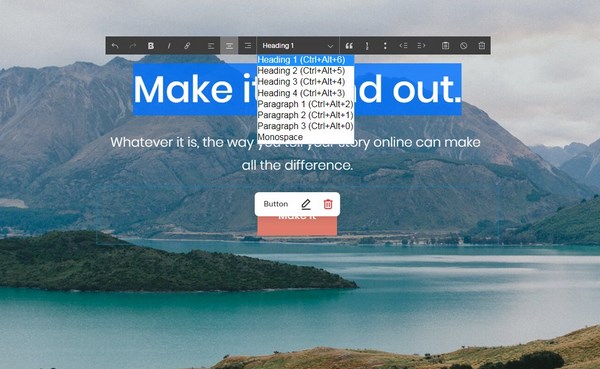
Squarespace comes with a built-in WYSIWYG editor that lets you track and control all the edits you make at the website. What’s important, the system developers have recently added the online editing feature and fixed the preview option, which was unavailable before. This has notably improved the efficacy and ease-of-use of the system. It has also become possible to switch between the editor and the preview mode online.
The platform is also rich in customer support options. It offers lots of tutorials, a Community Forum for users willing to discuss the burning issues with other system users, who can share their valuable personal experience. The website builder also provides live chat support, which is available 24/7 to help users solve their problems any time of the day. This contributes to a quicker and more effective website development process.
Additionally, Squarespace offers email support, the Tutorial Resources section with lots of videos and articles. The distinctive feature of the service is its one-on-one workshops held in the official Customer Care offices based in New York.
As seen from this part of the comparison, Squarespace is simpler and more intuitive for first-timers. Its interface is logical enough to be understood by inexperienced web designers. The system also offers quite powerful and versatile customer support, which helps resolve any system-related issues users may encounter.
Design and Flexibility

Duda and Squarespace can both offer a wide range of design customization tools and parameters, which make it possible to set up diverse types of web projects. At the same time, each system comes with a unique set of features that ensure its efficacy and let users adopt the decision regarding its choice. To identify the leader of the comparison, it makes sense to compare the major parameters of both platforms. Here they go.
eCommerce
Duda comes with a feature-rich eCommerce engine, which allows creating quality online stores. It’s up to you to pick a suitable template for your storefront, choose product page layouts, add digital/physical items, their descriptions and photos, indicate prices etc. There are also multiple eCommerce features, tools and integrations you can choose to diversify the design and performance of your web store. The website builder supports over 30 payment gateways, including Stripe, PaytPal etc. Users may work with promotional tools, email marketing features, special offers and discounts.

Squarespace boasts quite a powerful built-in eCommerce platform. The website builder allows launching and managing SSL-certified web stores, using an extensive set of niche tools/features. It ensures appealing product display options, creation of lightbox image galleries, addition of around 100 product variations, several payment and shipping options, email marketing tools as well as loyalty programs. The platform allows creating visually-impressive show windows to present the items to the advantage. Users may also choose from a collection of eCommerce themes with regard to their business specialization.

When it comes to the eCommerce aspect, Squarespace definitely prevails over its competitor. The website builder lets users set up and customize all kinds of web stores, offering extensive design customization, marketing and promotion features. As opposed to it, Duda offers more limited eCommerce features.
Blogging
Duda blogging platform allows webmasters adding flexible, feature-rich, responsive and fully-customizable blogs to their projects. The website builder offers a pack of blog templates and a quality toolset that can be used for their customization. There is also an opportunity to add and manage posts, integrate RSS feeds, share the available publication in the social networks etc.

Squarespace makes it possible to start and manage full-featured blogs, set up geolocation tags, enable comments and reblogging, RSS feed and other advantages. The system subscribers can also host blog podcasts, add and manage posts as well as import the available blogs from other platforms like WordPress or Tumblr, for example, to Squarespace. What’s important, no special coding skills are required to do that. Even a beginner can cope with the task.

As to the blogging aspect, Squarepsace unveils more extensive opportunities for its subscribers. Apart from standard features, the website builder allows for blog import. Duda does not offer this option, which is one of its demerits.
Integration Options
Duda is known for its extensive integration options. The system lets you pick and add social media elements and widgets to boost customer engagement rate and website performance in general. What’s more, the website builder stands out from the crowd due to its marketing tools that help increase customer conversion rates. These include click-to-call and click-to-email widgets, customer conversion widgets, maps, coupon code generator, PayPal widget and more. Integration of Google Analytics is also available here, which helps track your website performance parameters and detect the problems that may prevent you from reaching web design objectives.
Apart from adding ready-made extensions to the website, Duda also lets you build and customize your own widgets. For this very purpose, the platform grants access to its widget builder that encompasses the toolset needed for quality DIY widget creation. The process takes a few hours only yet it implies the awareness of basic HTML, CSS and JavaScript skills.
Squarespace does not allow for third-party integrations, yet it has its own widgets and add-ons that are highly effective, when it comes to the development of portfolios, web stores and business websites. The website builder has special widgets for photo galleries, social media buttons and even eCommerce tools for cafes and restaurants. It’s possible to integrate statistics tracking tools like Google Analytics, for example. There is also the Contact Form Builder here that lets users create and integrate logically-structured and appealing contact forms.
The system also comes with a convenient image manager that lets you adjust the parameters of photos you intend to upload to the website. It also allows for social media integration and Google Maps Embedding. To keep your target audience aware of the recent changes and upcoming events, it is possible to integrate an online calendar into your website, irrespective of its focus and niche specialization.
When it tackles the functionality aspect, both website builders have much to offer yet Squarespace grants access to a more powerful feature set. It is more oriented on portfolios and eCommerce websites, while Duda is a good pick for business and personal projects. Squarespace also offers advanced integration options, image editing parameters and other high end features that make it prevail over the competitor.
Special Features
Duda features multi language support, letting you choose between more than 55 languages to create a multi-language website. Another highlight of the service is its InSite Tool, which allows website owners to create personalized content geared towards a certain target audience based on the number of parameters (location, time of the day, devices used for web browsing etc.). The content is provided in the form of popups, which appear at the website, when a user accesses it.
For web design pros, Duda provides the Developer Mode feature that grants access to code editing and lets you customize the selected templates via code injection. Apart from this, the website builder encourages web developers to cooperate, while working on project development. The system makes it possible for team members to create separate sections and access a shared dashboard to let the developers get the most out of their team cooperation.
Duda also offers a powerful White Label tool, which allows using the entire feature set of the platform under a client’s brand name to create truly unique and impressive projects. Additionally, the system grants an opportunity to activate real-time dialogues with partners/clients as well as user comments, while working on your website development. This ensures a smooth and rewarding collaboration process between the members of your web design team.
Squarespace has the feature that lets you add multiple contributors to the project, which is under development. Thus, you can assign team members, who will have shared access rights to the website to make edits there. Commenting system feature is also enabled here to let users comment on blog posts and other content, if needed.
To boost your website performance and brand popularity, the website builder allows using its built-in marketing tools. They are handy when it comes to launching and holding email campaigns. Another Squarespace highlight is its Unfold App, which makes it possible to create appealing stories/posts and share them in social networks. The app can be downloaded from the Google Play Market or Apple App Store for free, yet there is a premium subscription for users, willing to use the advanced features of the platform.
For business owners willing to increase their brand visibility and recognition, Squarespace makes it possible to design a company logo to further add it to the newly-created website.
As to the abundance of special features, Squarespace offers more versatile options and tools that contribute to professional website development and customization. The website builder grants access to multiple marketing features, Unfold App, Logo Maker, social networking options, commenting and team collaboration opportunities.
Template Editing
Duda has a rich template collection that encompasses over 100 designs. The gallery is regularly updated to feature advanced and modern templates, which are fully-customizable and responsive by default. To simplify users’ choice, the developers have sorted out the templates by thematic categories and enabled the search filter option that helps cut down the search time.

Apart from niche templates, there is also an opportunity to pick a blank theme and customize it from scratch by using the extensive set of design customization parameters Duda comes with. You can preview Duda templates prior to proceeding to the customization process in order to see the way it will display on mobile and desktop devices. If there is something a user is not satisfied with, the system provides a template switch option that makes it possible to change the template midway through the web design process.
The very process of design customization is quick and rather simple. Due to the drag-and-drop feature, users will clearly see the entire process in action, being able to individually adjust the positions of elements they choose. Users, who possess coding skills, can go for the Developer Mode to use code injection advantages. Alternatively, the Code Editor lets you create and integrate new widgets/snippets on any web page by means of HTML/CSS code editing. This results in the creation of personalized website design.
Squarespace currently allows selecting from around 100 website layouts, which are compatible with any mobile/desktop devices. It should also be noted that the website builder focuses on the quality of its designs rather than on their quantity. As a result, Squarespace templates are more stylish, contemporary, customizable and professional. They are mobile-optimized by default and refer to different niches, such as blogs, professional portfolios, web stores, wedding and bridal websites, cafe and restaurant projects and more.
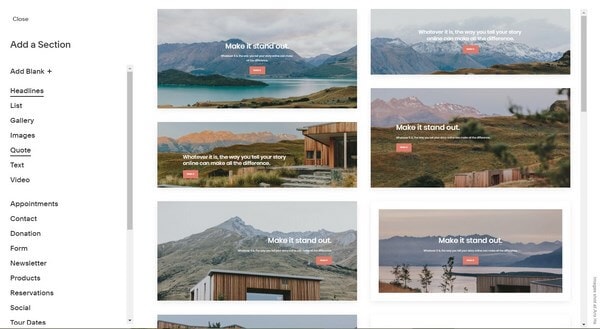
The highlight of the system is its Cover Page Builder, which lets a web designer create impressive and visually-appealing cover pages for their projects. There are dozens of cover page designs to choose from and multiple settings to get started (colors, fonts, backgrounds, media files etc.). Business Plan subscribers can make use of the HTML/CSS editing feature to edit website designs and to give them personalized look.
When working on website development, you can switch the templates on any stage of the process. If needed, you can also customize several designs at a time. Additionally, the website builder offers an extensive free selection of quality fonts from the Typekit collection, access to the Google fonts library, video background integration feature and other advanced design customization tools.
Speaking about design editing, Squarespace offers more professional, stylish and customizable templates to choose from. The system leaves much more place for creativity and design customization. This is the major feature that makes Squarespace the leader in this part of the comparison.
General Pricing Comparison

Duda is not cheap, but the cost of the plans comes up to the feature set provided. The system has a free 30-day trial and three paid subscriptions. These are Basic ($14/mo), Team ($22) and Agency ($74/mo) plans. The major factors that affect the cost of the plans are the number of projects users can develop, product assortment, possibility of team collaboration, web promotion and marketing tools, customer management options etc. Have a look at the plans and terms they include:
- Basic Plan ($14/mo) – one website + AWS hosting, email support, opportunity to sell up to 10 products;
- Team Plan ($22/mo) – all Basic features + premium support, team collaboration functionality, access to client management features;
- Agency Plan ($44/mo) – up to 4 websites, priority support, access to team and client management features, dynamic pages connected to customer data, extensible Widget Builder;
- Custom Plan (the cost is discussed individually) – access to Duda’s robust API, single Sign-On, onboarding & account management options, integration with external datasets, unlimited access to team & client management features, additional high-value managed services etc.
Additionally, Duda offers paid eCommerce add-ons to those users, who intend to design online stores. Their cost mainly depends upon the number of products you are going to offer for sale.
- 10 product store – free;
- 100 product store – $7.25/mo;
- 2500 product store – $19.25/mo.
Duda also has a tempting White Label solution for web agencies and independent professionals. Do you need a custom plan? It’s not a problem, when working with Duda. For customers with hundreds of websites under management, the website builder has a special offer – Tiered Discount Pricing, Dedicated Account Manager, Unlimited API Access & Advanced Support etc. Just get in touch with the system developers to find out the cost of these options.
Squarespace doesn’t have any free plans, yet it offers a 14-day free trial to test its basic feature set. Paid subscriptions encompass plans for standard websites and eCommerce projects. Depending upon your preferences and web design objectives, you may choose between four paid subscriptions:
- Personal ($12/mo) – 20 web pages, 3% sales transaction fee, free custom domain name;
- Business ($18/mo) – unlimited web pages, 2% sales transaction fee, AdWords credit;
- Basic ($26/mo) – unlimited number of products to sell, unlimited amount of storage and bandwidth, integrated accounting options;
- Advanced ($40/mo) – label printing, real time carrier shipping, abandoned checkout autorecovery.
All the plans come with SSL Certificates, unlimited storage and bandwidth, 24/7 customer support and free domain name connection option. Additional features have a direct impact upon the cost of the plans, so, be attentive when making the choice.
The pricing policy of both website builders is quite similar yet it is above the average. The systems have much to offer to users based on their actual needs. Squarespace, however, has separate plans for standard and eCommerce websites, which extends user choice.
Which One Is the Best for SEO?
Duda websites are well-optimized for the search engines. The website builder allows filling out meta tags (titles, descriptions, keywords) for all website pages. It also automatically generates site maps and lets website owners set up favicons, robots.txt files and 301 redirects for their projects. URL customization is available here as well. One of the system highlights is Vary: User-Agent tool, which notifies the search engines about the content popular with users with a special focus on the devices they choose.
Squarespace positions itself as a SEO-friendly website builder. The system makes it possible to fill out meta tags for website pages to properly adjust the major SEO parameters. An important aspect is that the system automatically chooses and adds post headings and product names along with SEO titles for the selected web pages. Manual editing is not available here. However, a nice bonus is an opportunity to hide your project from indexing by the search engines until it is ready for publication.
In terms of SEO, Squarespace offers more opportunities to properly adjust your project for the search engines. Along with basic parameters, it is possible to hide a website from indexation and to automatically pick headings/product names for certain pages. Duda definitely lags behind its competitor in this respect.
Key Differences Between Duda and Squarespace
| Duda | Squarespace | |
| Ease of Use: | Duda cannot be called the simplest website builder. It takes time and coding knowledge to master the system. The platform, however, offers an intuitive web design approach. Due to the integrated drag-and-drop editor, the process of website development becomes simpler for beginners. | Squarespace is a popular drag-and-drop website builder. It is not the easiest system you can find out there as it requires some time to explore it. The software works best for users with diverse coding skills, allowing them to launch web stores, blogs, business projects, landing pages etc. |
| Functionality: | The platform is used to set up personal and business web projects. It comes with blogging and eCommerce engines, advanced inSite tool, multiple third-party integrations, multilingual support and other merits, which have an impact upon users’ choice. | The system comes with a handy WYSIWYG editor, built-in SEO, statistics tracking tools, blogging and eCommerce engines. There are convenient social integrations, advanced marketing tools, Cover Page Builder, Logo Maker as well Google Maps embedding features here. |
| Design: | Duda’s template collection encompases 100 designs. They are free, responsive and customizable. Due to the preview option, it is simpler to pick a suitable theme here. An advanced Code Editor, in its turn, allows for more intuitive HTML/CSS code editing. | Squarespace collection of templates also includes over 100 pre-designed layouts. The designs are professional, stylish and responsive. They make it possible to launch different fully-customizable projects with regard to various niche requirements. |
| eCommerce: | The system boasts an integrated eCommerce engine, which lets you set up and manage a digital store. There is an opportunity to create and customize product catalogues, use several payment options and other eCommerce options here. | The platform also has a powerful eCommerce engine, which makes it possible to launch and update small and medium web stores, assigning special parameters to each of them. |
| Blogging: | The software has a built-in blogging platform. Its application allows creating blogs, adding new posts, updating the feed, customizing ready-made templates etc. | With Squarespace, setting up a blog is easy and quick. Due to the built-in blogging platform, everyone can add/update posts and customize their design/settings based on the available niche preferences. |
| Small Business: | The website builder works well for the development of small business projects. It uses a set of integrated niche tools and features to complete the task. | The software is a nice pick for small business websites. It allows integrating business widgets, media files as well as email marketing and statistics tracking tools to ensure professional business promotion. |
| Pricing: | Duda offers a free 30-day trial and 4 premium subscriptions. Their cost starts at $14/mo. | The system has a 14-day free trial and several pricing plans for standard and eCommerce websites. Their cost starts at $12/mo. |
| SEO: | Duda-powered websites are well-optimized for the search engines. The platform makes it possible to adjust baseline SEO parameters. There is an opportunity to work with the Vary: User-Agent tool to sort out the content users need with regard to the devices used. | Squarespace is a SEO-friendly platform. Along with the opportunity to fill out the major SEO parameters for proper project promotion, it also lets you hide a project or its pages from indexing by the search engines. |
| Customer Support: | Knowledge Center, Live Chat, webinars, video guides, ticketing system | 24/7 Live Chat, FAQ section, Community Forum, Ticketing System, Email Support |
Comparison Conclusion: Which One Is Better?
It takes time to figure out what service is more full-featured and applicable for your individual project – Duda or Squarespace – right from the start. Both website builders come with extensive functionality that covers the prevailing amount of user requirements, needs and expectations. The range of design customization tools and template selection options is also above the average. This allows for the effective development of different types of websites.
When it comes to the selection of the best platform, the final choice still goes down to Squarespace. The website builder has more to offer in terms of integrated functionality, customizability, variety of templates, customer support options and pricing policy. It takes some time to master the platform yet the result is worth that. Due to the availability of the blogging/eCommerce engines, built-in extensions, Logo Maker, extensive team collaboration opportunities, separate plans for standard/eCommerce projects and other advantages, Squarespace proves to be the top notch platform to work with.


