

Comparison of Bluehost and Squarespace seems to be a challenge at first sight because of the diverse implications and objectives of these two platforms. As opposed to Bluehost, which is a globally-recognized hosting provider, Squarespace positions itself as the all-in-one website builder that offers website development, promotion and hosting features. Each platform comes with a bunch of features and instruments to meet various website needs.
Bluehost – is the most recognizable hosting provider that powers millions of websites worldwide. At the same time, it is not just a hosting company, but also a WordPress recommended platform, which is a nice pick for all WP-powered website fans. Serving diverse web design news, the software abounds in plugins, add-ons, widgets, and other customization tools. In this review, we will consider it as the WP-based site + hosting package.
Squarespace – is a popular DIY website builder designed mainly for non-techies yet it also has much to offer to proficient web developers. The platform claims to be a full-featured tool when it comes to creating websites of any type from scratch. It can be a good builder and hosting for blogs, eCommerce sites, portfolios, etc.
To figure out all the weak and strong points of each platform and to define the best web design solution, it’s high time to have a detailed look at all the features they deliver.
General Overview

Bluehost is one of the most renowned and trusted hosting providers in the world. The software provides an extensive set of tools and features needed to effectively host any type of web project. It also abounds in business widgets and add-ons, eCommerce applications, WP tools and versatile customer support options that ensure hassle-free and reliable website development/hosting.
Founded in 1996, the platform has soon evolved into a powerful and feature-rich hosting provider. This is also the #1 hosting recommended by WordPress, which means that the platform is a perfect choice for all the web projects launched with the CMS. It offers a pack of tools, scripts and plugins that ensure quality performance of WordPress websites. Current Bluehost statistics tells about 4,355,208 websites powered by the platform.
Squarespace is a cloud website builder, which is a good option for newbies, considering its drag-and-drop nature. On the other hand, the system contains multiple advanced features, code editing options and tools that make it a good pick for professional web developers. As the all-in-one service, it makes it possible to start and host all types of online resources, including blogs, small business projects, portfolios, restaurant and cafe websites as well as small/medium digital stores.
The platform was initially introduced to the market in 2003, having acquired advanced web design features and customization options over time. Recent stats tells about 4,341,984 websites powered by Squarespace and many more are still under construction. This makes the platform one of the top web design systems in the modern web design market. It stands out from the crowd due to its intuitive web design approach and convenience that do not compromise with flexibility and reasonable pricing.
Bluehost and Squarespace are two different systems, which serve diverse goals. When used with WordPress, Bluehost can be used for website development and hosting, while Squarespace provides these options all in one pack by default. It also provides more integrated options for website customization and promotion, while Bluehost implies connection of extra plugins to complete the same goal.
Which One Is Easier to Use?

Bluehost comes with an intuitive cPanel, containing all the necessary instruments in one place. These include WP marketplace, domain management tools, advanced settings and more. What you should keep in mind, though, is that Bluehost is initially a hosting provider and not a web design platform. Thus, its integrated website development options are quite limited. However, the software is known for its WordPress-optimized server solution. It lets you take advantage of the integrated CMS functionality combined with quality and simple hosting.

If you are not new to WordPress, you can easily switch to the WP control panel with just a click. It will take you to the CMS, where you can start building a website from scratch as well. The system is pretty simple to use even if you do not have coding skills. WordPress also introduces advanced drag-and-drop capabilities to the editing process. Simply copy and paste content (images, videos, dmedia files, text, common blocks, widgets, layout and formatting elements, shortcodes etc.) to the page and publish it. If you don’t like anything about the editor, you can switch to the standard CMS dashboard any time.
One of the best things about Bluehost is that it features 100% compatibility with WordPress. You will be able to work in a simple dashboard that resembles the one used in the CMS. Being completely integrated into your website, the control panel allows adding/editing posts, new website pages and elements. You can also customize the web page structure, using HTML/CSS editing options, but this will additionally require the advanced technical background. You may also face the need to install third-party plugins depending on your website specialization and functionality.
In terms of customer support, Bluehost offers several ways to get in touch with the team. Apart from basic channels such as Live Chat, ticketing or phone, users will appreciate a separate WordPress support team. A team of experts is always ready to help with any WP-related issue. Additional support comes in the form of tutorials, how-to-guides, articles, etc. Moreover, you can use Bluehost services to get assistance with website customization, tools’ integration, optimization, etc.
Squarespace boasts improved usability, ensuring easy, smooth and hassle-free process of website development. The platform can be deployed by beginners and non-techies yet it has much to offer to web design pros. It can also be a good option for those who do not plan to hire custom developers or dive deep into the coding process themselves.
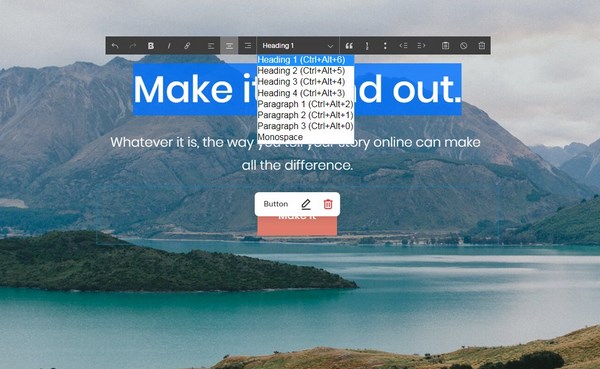
The website builder allows users picking and adding different blocks and managing content with ease thanks to the WYSIWYG editing tool. Mind that every time you change a page or section, it will be automatically saved. There is no preview mode to see how the future website will look like before publishing.
Although the platform now claims to be a 100% drag-and-drop tool, users will be surprised to know that nothing will happen when they hover the mouse with the image of video over the template. You need to access the Style Editor first and then to upload files you want to add. The Style Editor is the heart of the platform that lets users move different blocks, upload media content, resize elements and more.
Squarespace support team is available via Live Chat that claims to be accessible round the clock. You can keep in touch via email ticketing system as well. The platform has its own knowledge base including video tutorials, articles, and local Community Forum.
To sum it up, Bluehost may seem a simpler solution for users, who have got used to working with WordPress CMS. Even though, it’s not a drag-and-drop website builder, it grants access to the WP-based editor, letting you customize a web project with regard to your needs. Squarespace, in its turn, comes with the WYSIWYG editing panel yet it takes time/effort to explore and master it well.
Design and Flexibility

Bluehost and Squarespace differ in terms of usability, initial specialization, integrated functionality, pricing options and convenience. As a hosting provider, Bluehost offers more extensive and versatile hosting solutions, but it also allows for website development with WordPress. Squarespace, in its turn, is a website builder that provides web design, promotion and hosting services all in one pack. To define and pick the system that comes up to your actual needs and requirements, it makes sense to review and analyze their major parameters in details now.
eCommerce
Bluehost offers a set of tools required for successfully web store set up and promotion. The most useful of them include integrated shopping carts (Zen, Agora, OS Commerce and other shopping carts are accessible here), a built-in product management system, abundance of payment options, SSL Certificate connection etc. To avail maximum eCommerce options, it is recommended to sign up for the Plus Plan and enjoy its multiple advantages. Do you decide to go for the WP-optimized server solution? Then WooCommerce integration will ensure an amazing range of eCommerce-related options, tools and features.

Squarespace comes with the built-in eCommerce platform, which grants access to numerous options by default. The system makes it possible to set up small and medium online shops, using the tools provided out of the box. The system lets you integrate a shopping cart, create and manage product galleries, adjust product settings, add up to 100 SKU/product variations and add their descriptions, videos, photos, cost and other features users appreciate. The website builder frequently introduces discounts and special offers to win customer loyalty. It also has extra features for dining venues. With Squarespace, you will be able to pick from numerous eCommerce templates and customize them to your liking.

When it comes to eCommerce, Squarespace makes web store creation simpler and more convenient for all user categories. Due to the built-in eCommerce engine, it grants access to the extensive set of parameters available by default. Bluehost implies basine coding proficiency to set up a web store, especially if you intend to integrate its WooCommerce plugin.
Blogging
Bluehost unveils high end server solutions to bloggers, who have an intention to select WordPress as a web design platform. That’s no wonder, considering the fact that the CMS was initially created with blogging focus in mind. The software offers multiple blog management tools, opportunity to add/edit posts, select/customize blog themes, set up SEO parameters etc. As far as WordPress is frequently used in conjunction with Bluehost, there is no need to look for third-party hosting providers out there.

Squarespace offers a high end blogging engine by default, thus making it possible to set up and customize a quality feature-rich blog. To manage your project, you can add and edit posts, schedule new publications, enable a commenting feature, assign blog parameters etc. The system also has a quality collection of templates created with blogging objectives in mind. A real highlight of the system is an opportunity to transfer a blog created on WordPress, Tumblr or any other blogging platform to Squarespace servers. Thus eliminates the need to launch a new project from scratch.

As to blogging, both systems let their subscribers set up and manage quality blogs. Less effort and time will be required, when using Squarespace due to the availability of the integrated blogging platform. Bluehost also allows for professional blog development, although, WordPress application frequently implies extra integrations and coding proficiency.
Third-Party Integrations and Special Features
Bluehost obviously takes the win when it comes to flexibility. In reference to the open-source WP-based CMS, users can benefit from endless capabilities to customize their websites with no limitations. All you might need is some basic knowledge of how to code. It will make it easy to come up with any site despite the structure, design or complexity.
The integrated marketplace delivers hundreds of applications and add-ons out of the box. These include ready-to-install widgets like galleries, social media elements, integrable forms, shopping carts etc. Likewise, there is a possibility to apply for premium extensions and tools designed by third-party experts here. Bluehost pros will also land you a hand whenever you need to install plugins or services to your dashboard. They will help you with payment service integration, Google Analytics installation, contact form deployment, etc.

When used with WordPress, Bluehost notably extends its functionality and integration opportunities. The CMS is known for its advanced plugin integrations – take your time to choose from multiple free and paid extensions based on your website specialization and business objectives. Also, keep in mind automatic plugin and theme updates. Bluehost managed to create an automated WP-based website building service with all the necessary instruments in one place.
Squarespace also features deep flexibility, delivering a set of web building tools and capabilities. You can choose from add-ons and in-built integrations to make the website a bit more functional and unique. Users will appreciate a set of features that are good for different types of websites. Squarespace makes it easy to customize your pages. You can implement widgets to create catchy galleries, adjust social buttons, create custom contact forms, integrate analytic and stats tracking tools, etc. A slight demerit of the system is absence of its own App Market, but it is somewhat compensated by the availability of built-in widgets available in stock.
The website builder boasts an advanced tool – the Unfold App, which lets you create stories and impressive posts for social networks. You can download the tool from the App Store and Google Play Store at no cost at all. Another advantage of the platform is its Logo Maker, which is used to design a unique website logo. A few simple steps are required to do that – just enter your company name and choose some of the must-have elements to come up with a personalized logo design.

To sum it up, Bluehost boasts better flexibility compared to Squarespace. It has its own marketplace with thousands of WP themes, plugins and add-ons that are easy to integrate. The website builder, however, has much to offer in terms of integrations, even though, it does not have its own App Store. Special attention should be given to the high end Unfold App, Logo Maker and numerous marketing/statistics tools available in stock.
Template Editing
Bluehost does not include pre-designed templates, yet it still grants access to an endless array of themes developed for different CMS like Joomla, OpenCart, Drupal, Weebly as well as for HTML layouts.
The software is mostly known for its WordPress compatibility and, thus, users may get access to multiple templates developed for CMS. They include both free and paid themes for websites of any type whether you plan to launch a small digital shop, professional blog, small business website or anything else. The quality of each template might differ. On the other hand, you can navigate and preview themes before opting for any of them.

As a rule, all themes are mobile-responsive. They run equally well on different types of mobile devices (tablets, smartphones). All you need is to choose a category or topic that refers to your future site specialization and browse through all available options. The cost of responsive WP themes ranges between $29 and $200 depending on the layout.
A good piece of news is that you might need some basic HTML/CSS knowledge to customize the selected theme whenever you need to create a website with a unique design. Bluehost reserves endless customization opportunities for those, who have programming expertise. You are free to resize website blocks and elements, change typography, color background and other project parameters to create a truly personalized design.
Squarespace stands out from the crowd due to the impressive selection of mobile-responsive templates. Users have an opportunity to choose from 100 high end layouts which are sorted out by business niches here. The platform grants access to HTML/CSS files to customize the selected design with regard to your project needs. Of course, it will require some knowledge and coding expertise, which takes the platform far away from being the best option for newbies. It should be mentioned, though, that code editing option is currently available for Business Plan subscribers.
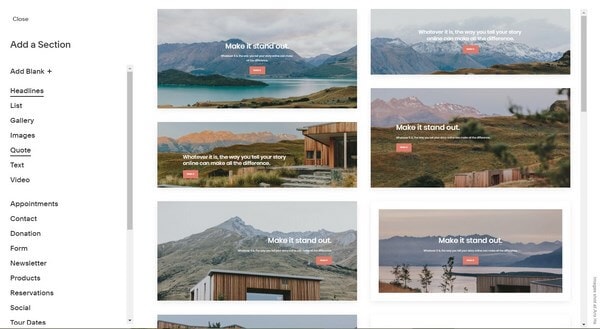
If you lack coding skills yet need a high end design, you can browse the collection of ready-made samples. Special attention should be given to themes developed for restaurant/cafe websites, digital stores, blogs, professional portfolios, wedding and bridal projects. In these categories, Squarespace does not seem to have many rivals. All the themes are stylish, professional and customizable.
The website builder also comes with a Cover Page Builder, which is a great tool for users willing to create individual landing page/one page designs. You can pick from over 29 ready-made layouts that can be customized as you need to design a unique cover page for your project.
The availability of the integrated Page Editor lets non-techies independently work on their web project customization, choosing from lots of elements/blocks available in stock. It’s up to you to use typography tools, animation/visual effects and other elements to ensure quality design creation.
When it comes to template editing, Squarespace is easier to work with due to the collection of ready-made designs. As opposed to it, Bluehost requires the choice of third-party themes developed for diverse software, including WordPress. Both platforms however, offer CSS and HTML access to customize the pages and implement any web design idea.
General Pricing Comparison

Bluehost offers a diverse selection of plans. The price will depend on the hosting type you need. Shared hosting solutions for your WordPress website are as follows:
- Basic ($2.95/mo) – 50GB of storage for a single website, unlimited bandwidth, custom themes, 24/7 customer support, free CDN, SSL and WordPress updates;
- Plus ($5.45/mo) – unlimited storage and websites, free Office 365 for 30 days, unlimited domains and bandwidth;
- Choice Plus ($5.45/mo) – all the unlimited features in addition to enhanced security and backups, free domain privacy, free automated backup for 1 year;
- Pro ($13.95/mo) – high level of website performance, dedicated IP, optimized CPU resources and other perks.
Bluehost users can benefit from an extended list of web capabilities delivered by Cloud, VPS (from $18.99/mo) or Dedicated (from $79.99/mo) hosting services for more complicated projects.
Squarespace has a 14-day trial to check how the system works. You are not obliged to enter your credit card info to use the trial, but the system will ask you to sign up for a premium account after the trial comes to its end. The available options are listed below:
- Personal Plan ($12/mo billed annually) – up to 20 pages, 2 contributors, integrated website metrics, free custom domain, SEO features, unlimited bandwidth and storage, SSL Security, 24/7 customer support etc.;
- Business Plan ($18/mo billed annually) – unlimited pages and AdWords Credit, 3% transaction fees, advanced website analytics, premium blocks and integrations, professional email from Google, fully-integrated eCommerce, unlimited contributors, CSS/JavaScript design customization etc.;
- Basic Commerce ($26/mo billed annually) – unlimited products, storage and bandwidth, Instagram synchronization, powerful eCommerce analytics, domain checkout feature, customer accounts etc.;
- Advanced Commerce ($40/mo billed annually) – real-time carrier shipping, gift cards, advanced shipping and discounts, limited availability labels, abandoned cart recovery, APIs for order and inventory etc.
Speaking about the pricing aspect, Bluehost seems to be a cheaper web building solution at first sight. However, you need to consider the potential necessity for extra integrations, which may also require budget investments. Squarespace offers fixed prices and a nice choice of plans differing in tools and options.
Which One Is the Best for SEO?

Bluehost has a team of experts, who are responsible for effective SEO optimization of the hosted projects. They work out the best strategy for each project with regard to its special characteristics and niche focus. It is also possible to integrate extra SEO plugins, when using the WordPress-optimized server solution. This will ensure better positions of your website in the search engine results.
Squarespace offers an opportunity to set up baseline SEO characteristics for effective promotion of your project in the search engines. You will get a set of standard tools to edit the title and description making them a bit more SEO-friendly. If you run a digital store, you can adjust product configurations. Additionally, it is possible to write meta tags for your website pages and to hide the project from indexing by the search engine bots until it is completely ready for publication. To simplify the process of search engine optimization for beginners, Squarespace offers a comprehensive checklist comprising the main points. If required, the website builder also allows consulting the system experts, who will help you pick the most effective SEO strategy.
When it tackles the SEO aspect, both systems ensure quality optimization of projects. While Squarespace comes with integrated baseline features and settings, Bluehost realizes the feature by means of WordPress SEO plugin integration. The services also offer qualified assistance from their experts, who will help their subscribers choose the most effective strategies for their project optimization.
Key Differences Between Bluehost and Squarespace
| Bluehost | Squarespace | |
| Ease of Use: | Bluehost is one of the most popular and convenient hosting platforms, which offers a range of server solutions as well as WordPress-optimized hosting, which simplifies the process of working with the CMS. | Squarespace is a well-known DIY website builder, which comes with drag-and-drop editing options. It lets you set up and customize different types of web projects for commercial and non-commercial use. No coding expertise is required to work with the platform. |
| Functionality: | The software encompasses high end performance, advanced flexibility and convenience. This is a perfect solution for WP projects, which saves your time/effort, when working with the CMS. The platform grants access to advanced integration options, functionality, integrated App Market and enhanced security. | The system comes with a simple and intuitive WYSIWYG editor, built-in blogging and eCommerce engines, Logo Maker, numerous social integrations etc. When launching a project with it, you can make use of the advanced Cover Page Builder, Style Editor, Google Maps embedding feature, stats tracking tools, Unfold App and other system advantages. |
| Design: | The platform doesn’t have its own template collection, but it lets its subscribers pick and customize the designs created for popular CMS, including WordPress. | Squarespace has a rich selection of quality templates, which are free, responsive and completely customizable. Everyone can access a set of customization tools, Image and Style Editors, Logo Maker to create personalized website design. |
| eCommerce: | Bluehost comes with a set of built-in features/tools needed to start and run a functional web store. These include integrated shopping cart functionality, product management and payment options, extensive store customization tools etc. | The website builder includes a quality eCommerce engine. It allows running small/mid-size web stores to offer physical/digital services/products for sale. |
| Blogging: | The platform does not encompass a blogging engine by default yet it lets you start a feature-rich blog with WordPress and host it on its servers. | Squarespace also has a comprehensive blogging engine, which allows setting up and managing a quality blog. The platform lets you add and edit posts, set up new publications, adjust blog design and its special parameters. |
| Small Business: | Bluehost lets you host business websites, ensuring high uptime rates, great website load speed and other advantages that are a must, when it comes to effective project development. | The service is a nice pick for small business website creation. Availability of widgets, media files, powerful integrations, Unfold App, stats tracking tools etc. makes the platform a worthy solution for your commercial project. |
| Pricing: | The hosting provider has a number of plans for diverse types of hosting. There are also premium subscriptions for WP websites. Standard pricing plans include 4 subscriptions, the cost of which starts at $2.95/mo. | Squarespace has a free 14-day trial and 4 paid subscriptions. Their cost starts at $12/mo. |
| SEO: | A team of SEO experts works for Bluehost, helping users boost their project positions by setting up the required parameters. WP website owners can additionally integrate SEO plugins to avail better results. | Squarespace is a SEO-friendly website builder, but it lets you set up baseline parameters only. The platform also offers a checklist to control the task completion and there is an opportunity to hide your project from indexing by the search engines, while being under construction. |
| Customer Support: | Live Chat, email, WordPress and phone assistants, ticketing system. | 24/7 Live Chat, Email Support, FAQ section, Community Forum. |
Comparison Conclusion: Which One Is Better?
It is obvious that Bluehost and Squarespace are totally different platforms. On the other hand, they have one crucial thing in common. They are both designed to help people build feature-rich websites. From this point of view, Bluehost looks like a more flexible and cost-effective option mainly due to the availability of its WordPress-optimized server solution.
Squarespace, in its turn, has much to offer to all user categories. The website builder positions itself as the all-in-one system, offering web design and hosting features in one pack. It comes with fixed pricing, integrated blogging/eCommerce engines, marketing, promotion and stats tracking tools. There is also a standalone gallery with ready-made responsive templates here, which eliminates the need to search for the required themes out there.Thus, it’s up to you to pick the platform that complies with your current web design requirements, preferences and objectives you pursue at the moment.


