

If you are looking for a robust website builder to set up a stunning site, consider Squarespace and WordPress. Both platforms allow users to create sites with little to no programming or technical skills (though WordPress requires some skills if you want to use the platform’s full potential) regardless of your project niche or business size.
From one side, Squarespace is a superb option for beginners, thanks to its ease of use and modern templates. On the other hand, however, it doesn’t allow the integration of many third-party apps.
On the other hand, WordPress is the opposite of Squarespace. It can’t boast in-house tools, but you can add whatever you need through multiple available plugins.
However, we shall take a deep dive into the descriptions of these two top website builders of the industry, look into their templates and customization options, SEO features, content management, ease of use, etc. By the end of this unbiased review, you will know better whether Squarespace or WordPress best meets your project requirements.
General Overview

Squarespace is one of the most popular heavyweights on the scene of website building nowadays. It was established almost two decades ago. The platform has since then been increasing in popularity, especially in Canada, the US, and Australia, thanks to its exceptional one-stop solution. According to recent stats, the overall number of websites the software powers has overcome 4,949,473 projects. This is quite an impressive result.
A beginner can set up a professional-looking site in only several minutes, and Squarespace will ensure the site runs smoothly. For a fixed monthly fee, the website builder provides all the necessary elements, including the template, eCommerce features, CMS, a domain, responsive support, and even hosting. Furthermore, during the past several years, the company completed its “all-in-one” approach to site building with Email Campaigns and Video Studio.
The main idea behind Squarespace SaaS (software as a service) site-building platform is its code-free solution that helps beginners set up and edit a site without any experience or knowledge in HTML or CSS.
WordPress, meanwhile, is available in two versions – Hosted WP and Self-hosted WP. The first option comes with a fixed price and is an all-in-one solution with a site builder, hosting, storage, and an impressive array of other features for setting up and maintaining an effective website.
The self-hosted WP variant is the most widely used (powers more than 43% of the web with over 61,909,719 projects worldwide). This is an open-source piece of software, meaning the code behind it is available for free and can be easily modified. Actually, a WordPress site can be customized to a considerable degree. WP is an exceptionally flexible tool that can be adapted to satisfy the requirements of any website design project, provided that the suitable plugins are installed and the web developer is a master of his work.
WordPress is free to use, and yet, some expenses can’t be avoided to bring it to the final look and functionality. It includes hosting costs, domain registration fees, and plugin prices.
Which One Is Easier to Use?

If you are an absolute beginner in website building, Squarespace is definitely your pick. It’s a highly beginner-friendly option that uses a visual drag-and-drop editor to move content anywhere. The website builder uses a block editor, which makes it a good choice for blog creation. The editor works much the same as WordPress, including adding images, audio files, videos, etc. Squarespace gives a user much control over the layout and content blocks of the site. Furthermore, it lets you customize the pages and templates with the help of its brand visual editor.

On the other hand, Squarespace doesn’t give a user a lot of choices. Its customization possibilities are enough for basic site requirements but relatively poor for professional website developers.
WordPress is currently one of the best options for those users who need a powerful platform to start a DIY website for a small business or blog. However, it definitely requires a slight learning curve if you have no experience or knowledge in website building. You need to familiarize yourself with some brand terminology and concepts such as categories vs. tags, posts vs. pages, themes, plugins, etc.

WordPress uses a fairly simple content editor with custom blocks to add content elements to your website pages and build attractive layouts with media-rich content. But to experience the full potential of WordPress and customize the site to your liking, you have to use third-party plugins and coding.
All the editing on a WordPress website is done in the backend, i.e., you don’t see the applied changes. Apparently, this is disorienting for new users since you have to go to the “front” to see what you have changed and then go back to the “behind the curtain” to augment anything.
So, Squarespace has a lot to offer beginners in terms of ease of use. It features a simple drag-and-drop template editor and lets you preview changes in real-time. However, the lack of choice that makes Squarespace an easy-to-use website builder also significantly affects its flexibility.
WordPress offers a lot of choices to its users right from the beginning. The customization options here are unlimited, yet a certain level of skills and knowledge is mandatory.
Design and Flexibility

Both Squarespace and WordPress come with premium design tools and ready-made templates to make it possible for users to create custom websites. First, however, it’s worth digging deeper into essential aspects of design and flexibility.
eCommerce
Both Squarespace and WordPress are good options for those users who want to sell online. The former makes it possible to set up an all-in-one virtual store and offers all the essential sales tools at hand, provided that you use the Business Plan or above. However, business plan owners are charged a 3% transaction fee on every sale made. All upper plans allow selling unmetered products, accepting donations, setting up a professional email, etc.
All the sales tools of Squarespace are fully integrated to help you create professional and seamless online stores. Basic Commerce and Advanced Commerce plans unlock fantastic features such as gift cards, label printing, advanced web analytics, abandoned cart recovery, product listings on social media, inventory, tax, coupons, subscription selling, etc.

Nevertheless, if you want to upgrade the functionality of your virtual store by adding shipping and tax tools, browse for them in the Extensions marketplace.
When selling with WordPress, meanwhile, you have to rely on plugins since the platform doesn’t offer any integrated eCommerce tools. However, WooCommerce is a powerful eCommerce plugin specially designed for WP. It has hundreds of themes, offers inventory management, a series of payment and shipping options, and allows physical and digital products to be sold.

WooCommerce stands out among other eCommerce plugins because it is entirely customizable – you can sell whatever products you wish, align your branding, and integrate powerful blogging tools. In addition, the platform provides round-the-clock support from WP experts, a free domain, and an SSL certificate.
Blogging
If you want to use your site’s blog to connect with your audience, be aware that both Squarespace and WordPress are up to the task. They support top-quality blog creating yet with slight differences.
Initially created as a blogging platform, WordPress offers many free templates catered to blog creation. The built-in blogging features include tagging and categorizing ability, a diversity of plugins to connect the blog to social media channels, direct HTML access, and a vast blogging community.

WordPress also provides a powerful content management system that allows you to create, edit, and organize your blog posts. You can use the visual editor to format your text, easily publish and schedule your articles, integrate media such as images and videos etc.
To conveniently organize your blog posts, the software allows using categories and tags. This helps you structure your content and allows readers to navigate through your blog to find relevant articles based on their interests.
If you wish to engage readers into active conversations when discussing your posts, go ahead to enable the commenting features. You will have full control over comment moderation to be able to approve and moderate comments as well as to reply to the selected messages.
As a CMS, WordPress grants access to the vast library of plugins and extensions that extend your blog functionality. You can find plugins for various purposes, including contact forms integration, SEO optimization, analytics tracking, security etc. This is how you can customize your blog to suit your specific needs.
Squarespace yields to WP slightly in terms of blogging. It offers free blogging templates to create either a compact magazine-style grid or a single reverse chronological feed of blog posts. Managing all the daily workflows, including categorizing, publishing, and tagging posts is done through the dashboard.

Due to the availability of the user-friendly interface, Squarespace subscribers can easily complete all the stages of the blog creation process. The website builder provides a robust content management system and the WYSIWYG editor to format your text, integrate images, embed videos and other required elements.
The system also makes it simple to integrate social sharing buttons into your blog posts. This makes it possible for blog readers to easily share your content on popular social media platforms, thus increasing the project visibility.
Commenting options are available here as well. You can choose to enable or disable comments, moderate them before they are posted and even integrate popular third-party commenting platforms like Disqus.
Squarespace automatically generates RSS feeds for your blog, letting readers subscribe and receive updates whenever you publish new content. This helps keep the audience aware of your blog news and recent publications.
Extensions and Special Features
All website-building platforms come with basic built-in features. However, when the site grows, you want to add more features and third-party tools to make it even more effective. In this regard, WordPress outperforms Squarespace since its real power is in its massive ecosystem of plugins. Actually, there are more than 55K WP plugins in the company’s directory alone, while third-party sites hold even more offers for WP users.
WordPress plugins aim at helping users to create and run eCommerce sites, sell online courses, build membership communities, make websites more visible for search engines, set up live chat software, etc. The possibilities are endless. Some of the most popular plugins are CrazyEgg, bbPress, Disqus, Elementor Page Builder, etc.
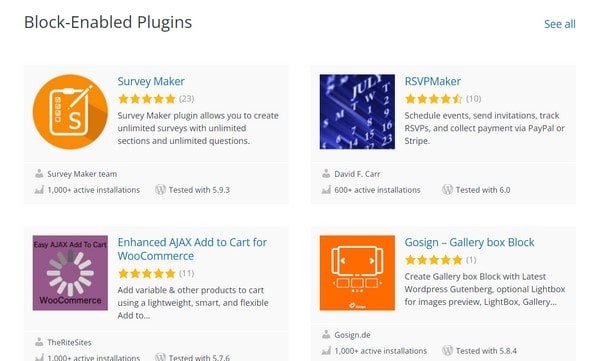
Together with extensions, WordPress offers tons of powerful tools, including password-protected pages, customizable designs, multilingual website options (with more than 70 languages available), image editing options, multiple contributors, publishing tools, comments management, etc.
Squarespace, meanwhile, is richer in built-in features, while the inventory of third-party apps is not as rich as that of WP. The in-built Squarespace features allow users to track site visitors and their actions, import content and embed feeds from social media channels, host podcasts and share them on Apple Podcasts or Spotify, categorize and schedule blog posts, etc. In addition, the company offers some social media integrations (Cover Page functionality) to share blog posts and new products through Twitter, Facebook, LinkedIn, etc.
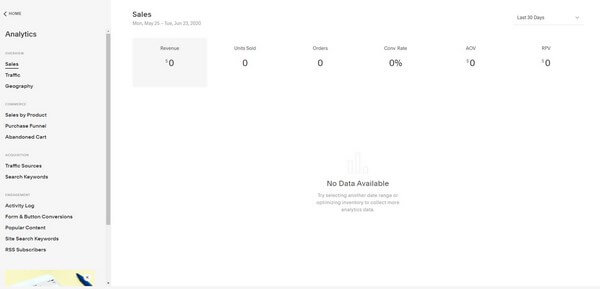
Meanwhile, the Squarespace Extensions market is rather poor, holding only around 24 plugins. However, you will hardly find it reasonable to integrate any of them since the built-in features of this website building platform are multiple and various. And yet, the small market of plugins is carefully stocked to find and add the necessary apps easily.
Template Editing
Squarespace features modern, clean, and professional-looking templates. Overall, there are around 140 themes separated into many categories, from blogs to stores. In addition, the builder allows changing the colors of the already chosen template, adding pages as you go, and applying some more modifications.
With the drag-and-drop editor of Squarespace, you can enrich your website design with slideshows, galleries, and video backgrounds with a few clicks. In addition, Squarespace suggests using the custom CSS editor to apply custom mode to the chosen template for more advanced users.

When editing templates with Squarespace, coding is an option, while with WordPress, it is a must. WP has hundreds of thousands of themes since it is an open-source platform. Around 10K themes are included in the WP theme directory, while third-party apps (Theme Forest, Template Monster, etc.) hold even more.
With WordPress, you can literally do whatever you want with the chosen theme. For this, though, you have to be pretty comfortable with coding. The themes come with multiple layout choices, image galleries, sliders, etc. Paid templates cost anywhere between $20 and $100 or even more. These are far more professional options and will cut down your time learning the template editing craft.

General Pricing Comparison

It’s not surprising that WordPress is the world’s most frequently used CMS. This open-source platform is entirely free to use. And yet, you have to make some investment to create a stunning website since the best templates are paid, not all plugins are free of charge, and the website hosting is to be paid for.
By the way, the cost of hosting depends on the company and plan you go for. There are actually several trusted variants to choose from. The most reliable of them is currently Bluehost. The CMS recommends it to host its projects.
The company is a trusted niche leader, which delivers a surprising variety of features, tools and services. The cost of its plans starts with $2.95 to reach $13.95/mo for the most expensive solution.
WordPress, however, appears exceptionally flexible since you can pick which extra features you want to integrate into your package yourself.
On the other hand, Squarespace introduces four pricing tiers to come up to any budget and project requirements. Have a look at them below.
- Personal ($16/mo billed annually) – 2 contributors, unlimited bandwidth and storage, SSL Security, 24/7 customer support, free custom domain, integrated website metrics, SEO features etc.;
- Business ($23/mo billed annually) – unlimited contributors, advanced website analytics, professional email from Google, 3% transaction fees, CSS/JavaScript design customization, fully-integrated eCommerce, premium blocks and integrations etc.;
- Commerce Basic ($27/mo billed annually) – customer accounts, domain checkout feature, powerful eCommerce analytics, Instagram synchronization etc.;
- Commerce Advanced ($49/mo billed annually) – abandoned cart recovery, gift cards, APIs for order and inventory, advanced shipping and discounts, limited availability labels etc.
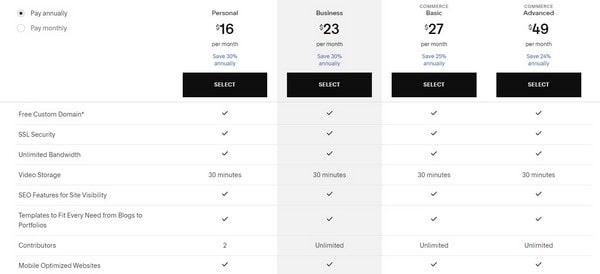
However, be aware that such extras as member areas, email marketing, and appointment booking are offered at an additional price (will cost $10 to $70 in total).
Which One to Choose for Blogging?

Squarespace offers a more streamlined blogging experience, which appeals to users willing to set up their first blogs. It has a user-friendly interface and a simple setup process with no coding required.
A separate category of professionally designed blogging templates (that are responsive, quality and require minimal customization) simplify the choice of the required theme.
Extra features like social sharing and commenting, post scheduling etc. allow for convenient blog management. Squarespace provides dedicated customer support and offers a subscription-based pricing approach to target diverse user categories.
WordPress has a steeper learning curve yet offers deeper customization options and flexibility. The CMS is highly customizable, offering a wide range of plugins, themes, and coding options. This flexibility makes it possible to launch a unique and personalized blog tailored to your specific needs.
The software stands out from the crowd due to its extensive plugin ecosystem. There are dozens of plugins to be chosen and installed to expand your blog performance. What’s more, WordPress is highly scalable and can accommodate blogs of all sizes, from personal projects to large-scale websites.
Unlike Squarespace with the availability of customer support options, WordPress boasts an extensive community of users and developers that provide support via forums, online resources and third-party services. As to the cost aspect, the CMS is free, but you’ll need to buy a hosting plan and potentially invest in premium templates and plugins based on your project requirements.
Which One Is Better for Small Business Websites?

Squarespace positions itself as a trusted and intuitive DIY website builder, which has much to offer to entrepreneurs willing to establish online presence. The system provides a simpler setup process and requires less tech knowledge, making it hassle-free to manage business projects of diverse complexity levels. As a company owner, you have an opportunity to select a template that works best for your website – there are several niche categories to choose from here.
The website builder comes with integrated eCommerce and blogging engines. As a result, business website owners can connect and manage full-featured web stores and blogs to reach their goals.
Squarespace provides an opportunity for online forms integration to let their clients get in touch with your company when required. It’s up to you to create forms to collect inquiries, feedback or customer information to establish a straightforward communication channel.
Finally, the website builder grants access to the range of business-related extensions available for integration. Google Maps, Logo Maker, payment systems, stats and analytic tools – these are only a few solutions that can contribute to your business development and promotion.
WordPress is flexible and customizable, letting you create a unique website tailored to your small business needs. It requires more skills and web design proficiency to get started with your small business website.
One of the software highlights is an amazing range of templates suitable for customization. You can find hundreds of them online and offline, divided into categories to simplify the search. WordPress themes can be free and paid, which allows you to pick the theme that fits your project budget.
The CMS also excels at plugin integration options. It grants access to a vast library of extensions, while more of them can be found on the web. They let you add extra functionality to your small business website. Currently, you can find plugins for contact forms, email marketing, SEO optimization, eCommerce/blogging, sales, customer interaction, social media sharing, analytics/stats tracking and more.
In addition, WordPress offers user management features that make it possible to assign various roles and permissions to individuals accessing your website. This is particularly useful for agencies working on their projects in teams.
Which One Is Best for eCommerce?

Squarespace boasts a built-in eCommerce engine. As a result, you have an opportunity to launch a small to medium online store from scratch. To do this, you just need to register for a personal account and pick one of the available eCommerce templates. Fortunately, there is a separate category of themes for web store set up and customization. They are all mobile-ready, ensuring that your online store looks and functions well on different devices. This eventually provides a seamless shopping experience to customers shopping online.
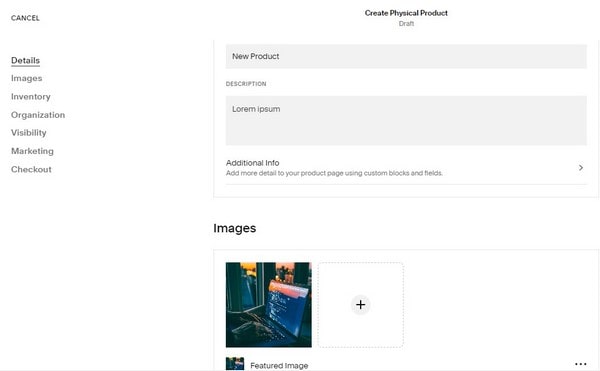
The website builder allows for easy and convenient product organization and management. You can easily add, edit, and organize product listings, including images, descriptions, pricing and inventory tracking options.
Squarespace includes a secure and streamlined shopping cart system. Customers can easily add products to their cart, review their preferences to proceed to the checkout process. This does not take much effort and time.
What’s more, the software integrates with various payment processors, including Stripe, PayPal, and Apple Pay among others. Such flexibility makes it simpler for customers to complete transactions and enhances their overall shopping experience.
Inventory management options are available here as well. Squarespace lets you easily manage your inventory. To do this, you have an opportunity to track stock levels, set low stock notifications and automatically display product availability to customers.
WordPress offers robust eCommerce features that are mostly realized via external plugin integration. As an open-source software, the CMS does not have a built-in eCommerce engine to set up a web store from scratch. Instead, it grants access to multiple niche plugins that work great for online shop creation.
The most popular plugin for those who plan to run full-featured online stores is WooCommerce. Offering extensive functionality to launch, customize and manage an online store, the plugin additionally provides features like product management, inventory tracking, opportunity of payment gateways integration, versatile shipping options, tax settings and order/client management.
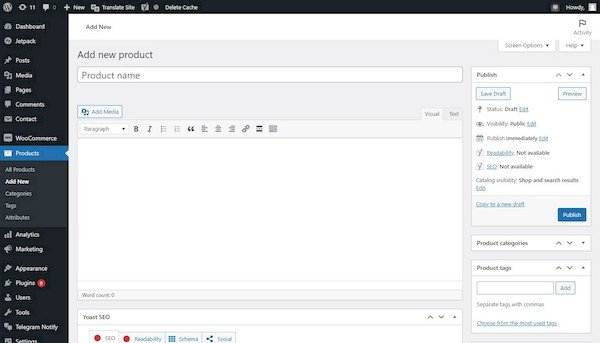
With WordPress, you can easily create product catalogs, adding, editing and organizing items available for sale. It’s up to you to set product attributes like size, color variations, product parameters and pricing options. Additionally, you can create product categories, tags, and custom fields to help customers navigate and filter products.
The CMS supports a wide range of payment gateways, letting you process online payments in a safe way. Popular payment solutions like PayPal, Stripe, Authorize.net etc. can be easily integrated into your eCommerce website when required.
The software offers a customizable shopping cart system that allows customers to add products, view cart contents to further proceed to the checkout page. If needed, you can customize the checkout process, collect customer information, and offer various shipping and payment options.
When using WordPress for your eCommerce needs, you will be able to adjust inventory management parameters, shipping options, tax calculations, discount and bonus solutions as well as analytics tools to track and analyze your eCommerce performance.
Which One Is the Best for SEO?

In terms of SEO, we have a tie. Both Squarespace and WordPress offer the required tools to make your website visible to all leading search engines.

From one side, Squarespace has integrated SEO tools such as customizable URLs, meta titles and descriptions, image alt text, page redirects, social media control, automatic sitemaps, etc. In addition, the platform allows you to customize your website page URLs to make them more readable for search engines.
Squarespace offers such a function as page redirects. If you change the URL of any page and a visitor tries to reach it through the old URL, Squarespace will automatically redirect the visitor to the new page. Meanwhile, if you want to keep any specific page of your site invisible to visitors yet, you can hide it from Google.
Anyway, thanks to using the best coding practices and standard HTML, WP comes SEO-friendly right out of the box. Unlike Squarespace, which has all its SEO tools integrated, most of the SEO features of WordPress are available via plugins. It has highly rated SEO plugins to boost the site’s visibility to search engines.
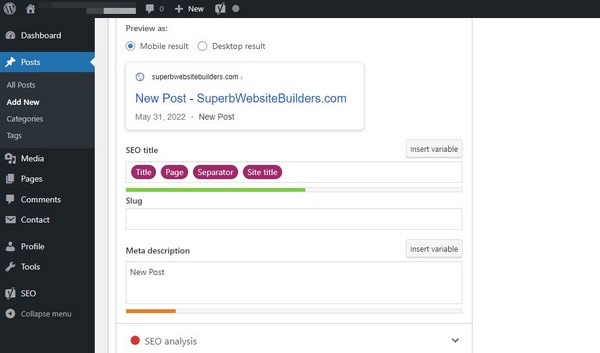
The best options here are Yoast SEO, with over five million installs. It allows adding meta titles and descriptions, and previews before publishing. The plugin offers effective keyword management and beneficial content analysis. You can use the readability score to value your website content and make sure it is targeted at your audience.
Comparison Conclusion: Which One Is Better?
WordPress is a superior website builder with a massive collection of plugins and themes. It’s incredibly flexible and appropriate for building any website regardless of the niche or the business size. WordPress can be turned into a powerful eCommerce platform with the right plugins integrated.
Nevertheless, you must have coding skills or pass a slight learning curve to make the most of WordPress. WP users are in charge of managing the site security, updates, backups, and hosting themselves.
On the other hand, Squarespace is much easier for small websites since it’s beginner-oriented. It ensures a hassle-free site setup and polished user experience. The platform also has a broad array of built-in features. And yet, Squarespace has limited design choices, and the pricing system can’t be described as wallet-friendly.


